Advertisement
How Can I Professionally Rewrite a Draft Email? A Practical Guide
To professionally rewrite a draft email, identify the purpose, identify the recipient, remove unnecessary wording, improve the structure, adjust the tone, clarify the requested action, correct the grammar, preserve the facts and intended meaning, and review the result before sending. An AI email rewriter can automate much of this work while you keep control of what goes out.
Most of us have written an email that we knew was not quite right: too long, too blunt, too casual for the person reading it, or simply unclear about what was being asked. The message is fine, but the wording is not. This guide shows you how to fix that yourself, step by step, and where an AI email rewriter can save you time.
Key Takeaways
- Professional rewriting changes how something is expressed, not what it says.
- Start with the purpose and the recipient before you edit a single word.
- Remove filler, put the main point early, and make the requested action explicit.
- Tone depends on the recipient, relationship, industry, purpose, urgency, and culture — professional does not always mean extremely formal.
- Never let a rewrite change names, dates, amounts, deadlines, commitments, or technical facts.
- An AI email rewriter can produce a draft rewrite in seconds, but you stay responsible for the final version.
- Always run the checklist at the end before you press send.
What "Professionally Rewriting an Email" Actually Means
People often use "rewrite" to mean several different things. Separating them makes the job much easier, because each one needs a different edit:
| Type of change | What it does | What it does not do |
|---|---|---|
| Grammar correction | Fixes spelling, punctuation, and agreement errors. | Does not improve structure or tone. |
| Rewriting | Replaces weak phrasing with clearer, better-organised wording. | Does not add new information. |
| Clarity improvement | Makes the point and the request unmistakable. | Does not make the message longer than it needs to be. |
| Tone adjustment | Changes how the message feels: warmer, firmer, more formal, more polite. | Does not change the facts. |
| Shortening | Removes repetition, filler, and unnecessary background. | Does not delete context the recipient needs. |
| Making it more persuasive | Strengthens the reason and the call to action. | Does not invent benefits or over-promise. |
One important correction to a common assumption: professional does not always mean extremely formal. A rigid, formal email to a colleague you work with daily can feel cold and slow things down. In practice, tone is decided by:
- Recipient — a manager, a customer, a supplier, or a professor.
- Relationship — first contact or five years of working together.
- Industry — some sectors expect formal language, others do not.
- Purpose — an apology, a request, an update, or a proposal.
- Urgency — a time-critical message benefits from being direct.
- Culture — levels of directness and politeness vary between languages and regions.
The goal of a professional rewrite is not to sound impressive. It is to be understood quickly, treated with respect, and to make the next step obvious.
How to Rewrite a Draft Email: An 8-Step Process
Work through these steps in order. They take about five minutes once you are used to them, and they are the same steps a professional rewrite applies automatically.
Step 1 — Identify the purpose
Ask yourself one question: what should the recipient understand or do after reading?
Common purposes include:
- Request information
- Schedule a meeting
- Follow up on something outstanding
- Apologise for a mistake or delay
- Request approval or a decision
- Explain a problem
- Send an update
- Make a proposal
If you cannot name the purpose in one sentence, the email is not ready to be rewritten — it needs to be clarified first. Everything that does not serve the purpose should be shortened or removed.
Step 2 — Identify the recipient
The same message is written differently for a manager, a colleague, a customer, a prospect, a supplier, a recruiter, a professor, or a partner. Consider what they already know, how much detail they need, and how much formality they expect. A customer does not need your internal ticket numbers; your manager probably does.
Step 3 — Remove unnecessary wording
Compare these two openings:
Weak
I just wanted to reach out to you because I was wondering if maybe you could possibly take a look at the report when you get a chance?
Better
Could you please review the report by Thursday?
The second version is shorter and easier to act on because it removes the hedging ("just", "maybe", "possibly"), the filler ("when you get a chance"), and the vague verb ("take a look"). Concise wording improves clarity because the reader spends less effort finding the point and more effort acting on it.
Step 4 — Improve the structure
A reliable structure for a professional email is:
- Greeting — appropriate to the relationship.
- Context — one or two sentences, only what is needed.
- Main point — the reason you are writing.
- Request or action — exactly what you need.
- Next step — timing, deadline, or what happens after.
- Closing — sign-off and contact details if relevant.
Step 5 — Adjust the tone
Decide the tone deliberately rather than letting the draft set it by accident. The common options are professional, formal, friendly, polite, concise, confident, persuasive, and empathetic. Each has a place — the tone table later in this article explains when to use each one. A useful test: read the draft aloud and notice whether it sounds like you are talking to this person.
Step 6 — Improve the clarity
- Use shorter sentences — one idea per sentence.
- Make the request specific instead of general.
- Put important information early, especially deadlines.
- Use bullets when you are listing three or more items.
- Give explicit dates rather than "soon" or "asap".
- State the next step so nothing stalls.
Step 7 — Preserve the facts and meaning
This is the step people skip, and it is the one that causes real damage. A rewrite must never silently change:
- Names and company names
- Dates and times
- Amounts, prices, and quantities
- Commitments and promises already made
- Deadlines
- URLs and references
- Technical facts and specifications
- Product details
If a sentence feels wrong but contains a fact, fix the wording around the fact — never the fact itself.
Step 8 — Proofread before sending
Run through this quick check: recipient, names, attachments, links, dates, tone, facts, and the requested action. It takes under a minute and catches almost everything that matters.
Advertisement
Before and After: 8 Rewriting Examples
The fastest way to learn a rewrite is to see one. Each example shows the original draft, the professional rewrite, and exactly what changed.
1. Email to a manager
Original draft
hey, so the thing we spoke about, I looked at it and there are some issues, can you maybe advise?
Professional rewrite
Hi Sara, I reviewed the vendor contract we discussed on Monday and found two issues in the payment terms. Could you advise which option you would like me to pursue by Wednesday?
What changed?
Named the document and the problem, replaced "the thing" with something specific, added a deadline, and made the requested action clear.
2. Email to a customer
Original draft
your order is late thats not our fault the courier messed up, nothing we can do
Professional rewrite
Hello Anna, I am sorry your order has not arrived on time. The carrier reported a delay on the route to your area. I have contacted them for a revised delivery date and will confirm it here by tomorrow at 5 pm.
What changed?
Kept the facts (the delay, the cause) but replaced the defensive tone with accountability, and added a specific next step and time.
3. Follow-up email
Original draft
Just checking if you saw my last email about the quote.
Professional rewrite
Hi Tom, following up on the quote I sent on 12 September. Are you able to confirm whether you would like to proceed? If you need any changes to the scope, I can send an updated version the same day.
What changed?
Referenced the original email with a date, asked a question that is easy to answer, and offered a concrete option instead of a passive nudge.
4. Meeting request
Original draft
we should meet at some point to talk about the project, let me know when you are free
Professional rewrite
Hi Léa, could we schedule 30 minutes to agree the project scope? I am available Tuesday 10:00, Wednesday 14:00, or Friday 09:00 (CET). If none of these work, send two slots that suit you and I will confirm.
What changed?
Stated the purpose and duration, offered specific options with a timezone, and removed the burden of proposing a time from scratch.
5. Apology email
Original draft
Sorry sorry for the delay, it wasnt my fault and anyway here is the file now
Professional rewrite
Hello Marc, I am sorry the report reached you later than we agreed. The final figures took longer to validate than expected. The completed report is attached, and I have moved our review to Thursday to keep the timeline on track.
What changed?
Removed the repeated apology and the blame-shifting, gave one brief reason, stated what is attached, and showed what happens next.
6. A long email, shortened
Original draft (178 words)
I hope you are doing well. I am writing because I wanted to take a moment to explain the background of the project so you have the full picture before we go any further. As you may remember, we started this initiative back in March after a series of internal discussions that involved several teams, and over time the scope shifted a number of times as we received feedback from different stakeholders...
Professional rewrite (54 words)
Hi Priya, quick context before our meeting: the project scope changed twice since March as stakeholder feedback came in. The current version adds reporting but drops the mobile phase. The decision I need from you on Thursday is whether we accept the reduced scope. Two slides summarise the changes — attached.
What changed?
Kept the origin, the changes, the decision, and the deadline. Cut the narrative filler. Notice that no fact was lost — only the padding was.
7. A more polite rewrite
Original draft
Send me the invoice today. I need it now.
Professional rewrite
Hi Sam, would you be able to send the invoice today? Our finance cut-off is at 4 pm, so receiving it before then would let me include it in this cycle.
What changed?
Framed the request as a question and gave the reason, which makes it easier to comply with and far less confrontational — without weakening the deadline.
8. A more confident rewrite
Original draft
I think maybe we could possibly try the new approach, if thats okay with you, although I might be wrong.
Professional rewrite
I recommend we switch to the new approach. It removes the manual step and has worked in our two most recent runs. I will prepare the change for Monday unless you have concerns.
What changed?
Replaced hedging with a clear recommendation backed by evidence, and added a default action. Confident means direct, not aggressive — there is still room for objection.
A detailed example: wording improves, meaning stays identical
Check the facts yourself — this is the standard every rewrite must meet.
Original draft
hi just to say the price for the annual plan is going up to 349 dollars from the 1st of november and your renewal on the 15th of october will be at the old rate of 289 dollars so nothing changes for you this year, details are here https://mailcannon.pro/pricing
Professional rewrite
Hi Julia, a quick note about pricing. The annual plan increases to $349 from 1 November. Your renewal on 15 October will be charged at the current rate of $289, so nothing changes for this billing cycle. Full details are available at https://mailcannon.pro/pricing
What changed?
Structure, sentence breaks, capitalisation, greeting, and readability. Facts preserved: $349, 1 November, 15 October, $289, the URL, and the meaning that this cycle is unaffected.
How AI Can Professionally Rewrite a Draft Email
The manual process above works, and it is worth learning. An AI email rewriter simply applies it much faster. A practical workflow looks like this:
- Paste the draft into the tool.
- Tell the AI who the audience is — customer, manager, prospect, partner.
- Select the desired tone — professional, formal, friendly, confident, and so on.
- Specify what should change — shorter, clearer, more formal, more polite, or another goal.
- Generate the rewrite.
- Compare it with the original side by side.
- Verify the facts — names, dates, amounts, deadlines, links.
- Make your final edits in your own words where needed.
- Send.
One rule matters more than the rest: AI is an assistant, not the author of record. For important messages, review the result before sending. AI does not understand every context perfectly — it cannot know what you promised verbally last week or which contract clause applies. You do, so you make the final call.
MailCannon's AI Email Rewriter
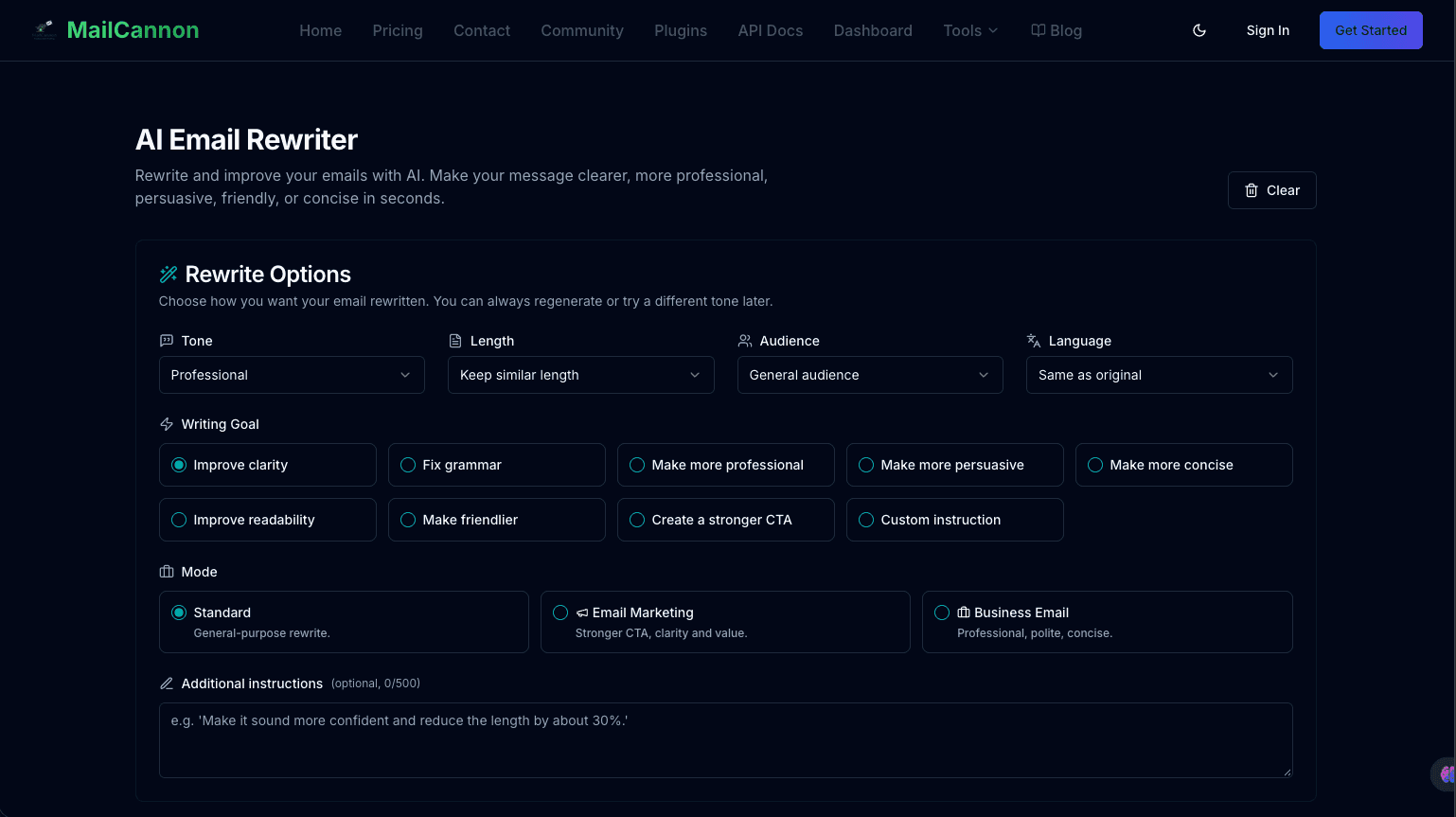
MailCannon's AI Email Rewriter helps turn an existing email draft into a clearer, more polished version while letting you control the tone, length, audience, and goal of the rewrite. It is built for the situation where you already have a draft and you want better wording — not for writing a message from nothing.
What you can control in the tool:
- Tone — Professional, Friendly, Casual, Persuasive, Formal, Conversational, Empathetic, or Confident.
- Length — Shorter, Keep similar length, or More detailed.
- Audience — Customer, Prospect, Business partner, Manager, Employee, General audience, or a Custom audience you describe yourself.
- Language — keep the same as the original, or rewrite into English, French, Arabic, or Spanish.
- Writing goal — Improve clarity, Fix grammar, Make more professional, Make more persuasive, Make more concise, Improve readability, Make friendlier, Create a stronger CTA, or a Custom instruction.
- Mode — Standard, Email Marketing, or Business Email.
- Additional instructions — free-text guidance of up to 500 characters, for example "make it about 30% shorter but keep the deadline".
How to Use the MailCannon AI Email Rewriter
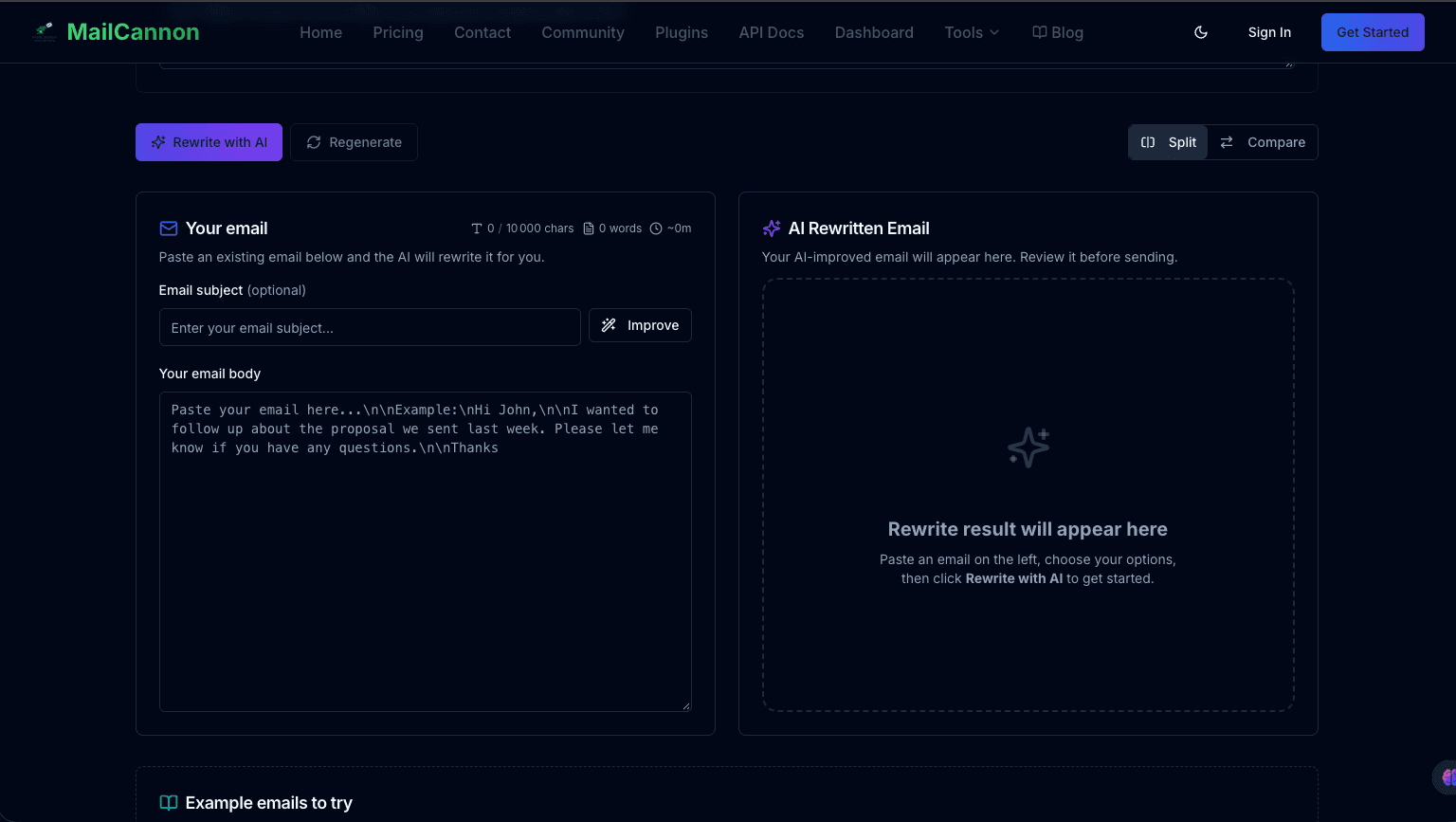
- Open the AI Email Rewriter at /tools/ai-email-rewriter.
- Paste your draft into the email box. You can optionally add a subject line above it. The draft needs at least 20 characters and can be up to 10,000 characters.
- Select your options — tone, length, audience, language, writing goal, and mode. Defaults are Professional tone, keep similar length, general audience, improve clarity, same language, Standard mode.
- Add any extra instruction in Additional instructions if you need something specific.
- Click Rewrite with AI. The result appears next to your original, and you can switch between the split and compare views.
- Review it against the original and check the facts carefully.
- Copy or use the result with Copy or Use This Version. If it is not quite right, press Regenerate for another version with the same options, or pick a different suggestion under Try another tone.
Every rewrite is kept in a small version history, so you can move between attempts instead of losing a good one. The tool also shows word and character counts for the original and the rewrite, and detects whether your draft contains a call to action.
When an AI Email Rewriter Is Useful
A rewriter is the right tool when you already have something on the page. Common cases:
- Wording that feels awkward or clumsy.
- Language that is too informal for the recipient.
- You need a professional tone but are short on time.
- The email is too long and needs to be shorter.
- You want a request to sound more polite.
- English (or another language) is not your first language.
- You need to adapt the same message to a different audience.
- The message is clear to you but probably not to the reader.
- You are polishing an existing draft rather than starting fresh.
- You write similar messages repeatedly and want consistency.
Be more careful in some situations. For legal communications, financial instructions, medical communications, contracts, sensitive HR matters, confidential information, and significant commitments, slow down: rewrite manually or have the right specialist review the result. These are cases where a subtle wording change can carry real consequences.
AI Email Rewriter vs Writing From Scratch
A rewriter is not always the right choice, and that is fine. Use whichever approach fits the situation:
| Situation | Useful approach |
|---|---|
| You already have a rough draft | AI email rewriter |
| You know the topic but have no draft | AI email generator |
| You only need grammar corrections | Grammar or editor tool |
| You need a different tone | AI email rewriter |
| You need to shorten an email | AI email rewriter |
| You need a complete campaign | Email generator or template |
No approach is universally better. A one-line reply to a colleague needs no tool at all — and that is the right answer for it.
Prompt Examples for Rewriting an Email Professionally
If you are working inside a general AI assistant rather than a dedicated tool, the instruction you give matters a great deal. A good prompt tells the AI what to change and, just as importantly, what to leave alone. Start with this core prompt:
Rewrite this email in a professional and concise tone. Preserve all names, dates, amounts, commitments, and factual information. Do not add information that is not in the original email. Make the request clear and keep the meaning unchanged.
Variations for common situations:
- Formal: "Rewrite this email in a formal tone suitable for an official communication. Keep all facts unchanged and keep it under 150 words."
- Friendly: "Make this email warmer and friendlier while keeping the same meaning and all details intact."
- Concise: "Shorten this email to under 80 words. Keep the request, the deadline, and every factual detail."
- Polite: "Make this request more polite and courteous without losing the deadline or making it vague."
- Customer-facing: "Rewrite this for a customer: professional, empathetic, and clear about the next step. Do not make promises we did not already make."
- Manager: "Rewrite this for my manager. Lead with the decision I need, keep context to two sentences, and list options as bullets."
- Follow-up: "Rewrite this as a short follow-up that references the previous email and asks one clear question."
- Apology: "Rewrite this as a sincere, accountable apology. Acknowledge the impact, give the reason briefly, and state the corrective action."
In the MailCannon rewriter you do not need to write these prompts — the tone, goal, audience, length, and mode fields do that work for you, and Additional instructions is where the specific constraints go.
Should AI Change the Meaning of My Email?
No. A professional rewrite should improve presentation without changing the intended meaning or inventing facts. The wording gets better; the substance does not move.
Before you send anything that was rewritten, verify:
- Names
- Dates
- Prices and other amounts
- Numbers and quantities
- Deadlines
- Promises or commitments you have made
- Technical details
- Attachments
- Links
If any of these differ from your original, correct them before sending. This habit is the difference between a rewrite you can trust and one you have to re-check line by line.
How to Make an Email Sound More Professional
Replace these habits:
- Vague requests → "look into it"
- Unnecessary apologies → "sorry to bother you again, so sorry"
- Long introductions → three sentences before reaching the point
- Filler → "I just wanted to quickly reach out"
- Repetition → saying the same request twice in different words
- Emotional wording → "this is extremely frustrating"
- Unclear next steps → no deadline, no owner, no action
With these:
- Clear purpose — stated in the first two lines.
- Concise context — only what the reader needs.
- Specific request — one ask, stated plainly.
- Appropriate politeness — courteous, not grovelling.
- Clear next action — what happens, by when, by whom.
- Professional closing — sign-off and a way to respond.
A note worth keeping: informal is not the same as unprofessional. A short, friendly message to a teammate can be perfectly professional. What damages an email is vagueness, disrespect, or leaving the reader unsure what to do.
Email Tone Guide
| Tone | When to use it | Direction |
|---|---|---|
| Professional | General business communication | Clear and respectful |
| Formal | Official or high-stakes communication | Structured |
| Friendly | Familiar professional relationships | Warm but clear |
| Polite | Requests and sensitive topics | Respectful |
| Concise | Busy recipients | Minimum necessary context |
| Confident | Proposals and requests | Direct, not aggressive |
| Empathetic | Difficult situations | Acknowledge the recipient's perspective |
Common Rewriting Mistakes
- Changing the meaning while improving the wording.
- Adding information that was never in the original.
- Making every email extremely formal.
- Removing context the recipient actually needed.
- Making the email longer than it needs to be.
- Stripping out necessary politeness.
- Adding unnecessary jargon to sound senior.
- Leaving the requested action unclear.
- Forgetting to attach the attachment.
- Sending AI output without reviewing it.
Email Rewriting Checklist
Run this before you press send. It applies whether you rewrote the email by hand or used AI.
Content
- Is the purpose clear?
- Are the facts correct?
- Is the intended meaning preserved?
Tone
- Is the tone appropriate for this recipient?
- Is it respectful?
Structure
- Is the main point easy to find?
- Is the requested action clear?
Accuracy
- Are the names correct?
- Are the dates correct?
- Are the numbers correct?
- Are the links and attachments correct?
Final review
- Would the recipient understand exactly what is expected of them?
Related MailCannon Tools
Once your wording is right, these free tools help with the rest of the send: test a subject line, write a matching preheader, check the body with the spam checker, see how it renders with email preview, and verify a recipient address with the email existence checker.
Frequently Asked Questions
How can I professionally rewrite a draft email?
Identify the purpose and the recipient, remove unnecessary wording, improve the structure, adjust the tone, clarify the requested action, correct grammar and wording, preserve the facts and intended meaning, then review the final email before sending. An AI email rewriter can automate much of this process.
How do I make my email sound more professional?
State the purpose early, replace filler with a specific request, use short sentences, put important information first, give explicit deadlines, and close with a clear next action. Professional usually means clear and respectful rather than extremely formal.
Can AI rewrite an email professionally?
Yes. An AI email rewriter can restructure wording, adjust tone, and shorten or clarify a draft. AI works as an assistant: for important messages you should compare the result with the original and verify names, dates, amounts, and commitments before sending.
Can AI rewrite an email without changing its meaning?
It should, and you can instruct it to. A professional rewrite improves presentation without changing the intended meaning or inventing facts. Always verify names, dates, prices, numbers, deadlines, promises, technical details, attachments, and links before sending.
How do I make an email more polite?
Use a courteous greeting, frame requests as questions, soften blunt phrasing with words such as please or would you be able to, acknowledge the recipient's time or constraints, and keep a respectful closing. Remove unnecessary apologies rather than adding more of them.
How do I shorten a long email?
Keep one main point, delete repeated context and filler, split background into a short paragraph, use bullets for lists, move the request to the top, and cut anything the recipient does not need in order to act. Keep the deadline, the ask, and any commitment that affects the recipient.
What is an AI email rewriter?
An AI email rewriter is a tool that takes an existing draft and produces a revised version with clearer wording, a different tone, or a shorter length, while keeping the original facts and meaning intact.
Is it safe to use AI to rewrite emails?
It is safe for everyday professional correspondence when you review the output. Be especially careful with legal communications, financial instructions, medical information, contracts, sensitive HR matters, confidential information, and significant commitments.
How do I rewrite an email for a customer?
Address the customer by name, acknowledge their situation, state clearly what you are doing and when, give a specific next step, and keep the tone warm and accountable. Avoid internal jargon and never over-promise a date or outcome.
How do I rewrite an email to my manager?
Lead with the outcome or decision you need, keep the context to two or three sentences, use bullets for options or status, and state any deadline explicitly. Make the requested action obvious in the first lines.
How do I rewrite an email in another language?
Write or paste the draft in its current language and ask for the rewrite in the target language, keeping names, numbers, and dates unchanged. A tool with a language option can do this in one step, and you should still have a fluent speaker review important messages.
Should I review an AI-rewritten email before sending it?
Yes. Check the recipient, names, attachments, links, dates, tone, facts, and the requested action. AI output should always be reviewed before an important email is sent.
Conclusion
Rewriting an email professionally is a repeatable process: know the purpose, know the reader, cut the filler, fix the structure, choose the tone, make the ask obvious, and never touch the facts. Learn to do it manually and every message you write gets better. When you have a draft in front of you and a deadline to meet, an AI email rewriter applies the same steps in seconds — as long as you review the result before it goes out. When you are ready to send, pair good wording with a strong subject line and a quick spam check.
Have an Email Draft That Sounds Off?
Try the MailCannon AI Email Rewriter and turn an awkward or overly informal draft into a clearer, more polished version — with the tone, length, and audience you choose.
Advertisement