Advertisement
What Is SMTP? How the Email Sending Protocol Works
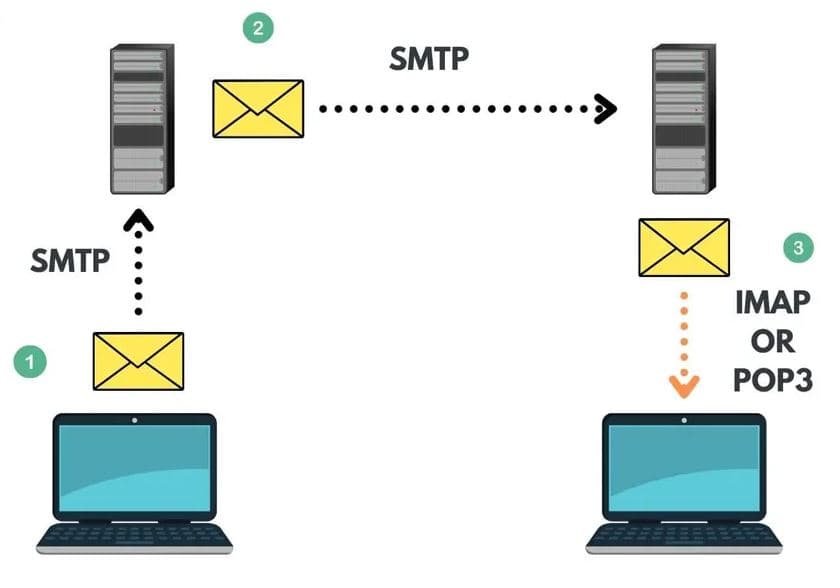
SMTP (Simple Mail Transfer Protocol) is the standard Internet protocol used to send email. When an email client, website, or application sends a message, SMTP handles its submission and transfer toward the recipient's mail server. SMTP is primarily associated with sending and relaying email, while IMAP and POP3 are used to access messages stored in a mailbox.
Key Takeaways
- SMTP stands for Simple Mail Transfer Protocol.
- SMTP is used to submit and relay outgoing email.
- Port 587 is commonly used for authenticated email submission with TLS.
- Port 25 is primarily associated with server-to-server SMTP relay.
- Port 465 is used for SMTP submission with implicit TLS.
- Applications can also send email through an HTTP API instead of directly configuring SMTP.
What Does SMTP Stand For?
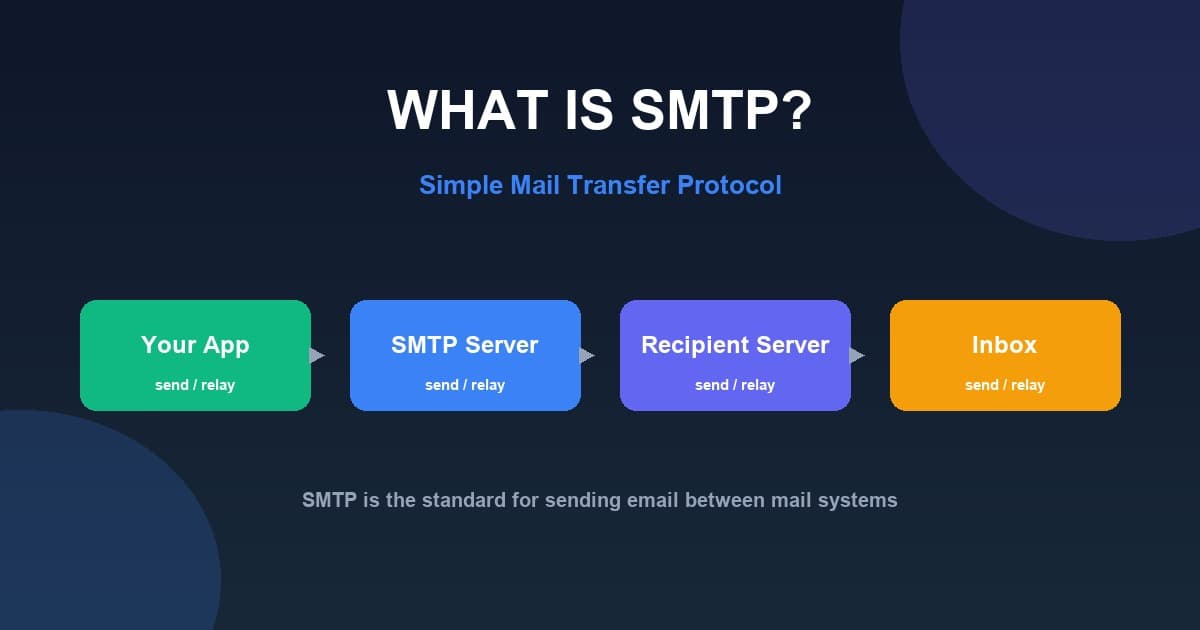
SMTP stands for Simple Mail Transfer Protocol. Breaking down the name:
- Simple — the protocol defines a straightforward set of commands
- Mail — it deals with email messages
- Transfer — it moves messages between systems
- Protocol — it is a set of rules for communication
SMTP is primarily a sending and submission protocol. It is the protocol used to send and relay outgoing email, not to read it.
What Is SMTP?
SMTP in simple terms: SMTP is the standard protocol that applications, websites, and email clients use to send email. It handles message submission to a mail server and the relay of that message toward the recipient's mailbox. Without SMTP, there is no standard way for an application to hand an outgoing message to the email infrastructure.
What does SMTP do? When you compose and send an email, your email client connects to an SMTP server, authenticates, and submits the message. That server then relays the message — often via DNS and MX-record lookup — toward the recipient's incoming mail server for final delivery.
Is SMTP used to send or receive email? SMTP is used to send and relay email. It is not the protocol used to retrieve or read messages already stored in a mailbox — that role belongs to IMAP and POP3.
What Is an SMTP Server?
What is an SMTP server? An SMTP server is a mail server responsible for accepting and relaying outgoing email according to its configuration and policies. It can:
- Authenticate senders
- Accept messages
- Relay messages toward their destination
- Communicate with other mail servers
- Apply sending policies and limits
- Return delivery errors when delivery fails
For example, when an email application sends a message, it connects to an SMTP server that accepts the message, authenticates the sender, and relays it toward the recipient's mail server.
How Does SMTP Work?
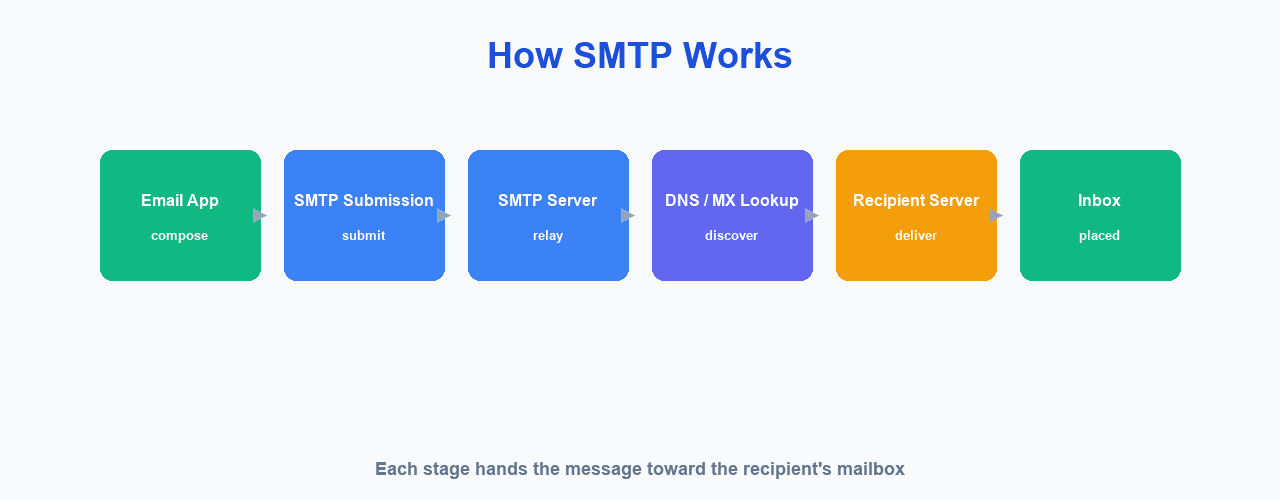
At a high level, every SMTP transaction follows the same flow — from composition to delivery:
Sender
  ↓
Email Application / Website          ← email composition
  ↓
SMTP Submission Server               ← SMTP connection + authentication
  ↓
SMTP Relay                           ← message transfer
  ↓
Recipient Mail Server                ← recipient mail server
  ↓
Recipient Inbox
Each stage has a role:
- Email composition — the sender or application composes the message including headers, body, and any attachments.
- SMTP connection — the client opens a connection to the SMTP submission server on the configured port.
- Authentication — the server verifies the sender's identity before accepting the message.
- Message transfer — the client transmits the message; the server may relay it through intermediate hops.
- Recipient mail server — the destination server receives the message for final delivery, discovered via DNS MX records.
- Recipient inbox — where the message is made available to the recipient via IMAP or POP3.
SMTP Example: Sending an Email
Consider a simple example. Alice sends from alice@example.com to bob@example.net:
Alice's application
       ↓
SMTP server
       ↓
example.net mail server
       ↓
Bob's mailbox
To route the message, SMTP uses DNS and MX records to discover the recipient's incoming mail server. The message then travels from Alice's sending infrastructure to Bob's mail server.
Common SMTP Commands
SMTP clients talk to servers using a small set of text commands. These are the commands you will see in most SMTP conversations (defined in IETF RFC 5321):
| Command | What it does |
|---|---|
| HELO / EHLO | Opens the session and identifies the client (EHLO requests ESMTP extensions). |
| MAIL FROM | Starts a message and declares the envelope sender address. |
| RCPT TO | Declares a message recipient; repeat for multiple recipients. |
| DATA | Begins the message body transfer, ended by a line containing only a period. |
| RSET | Aborts the current transaction without closing the connection. |
| QUIT | Closes the SMTP session. |
SMTP Ports Explained
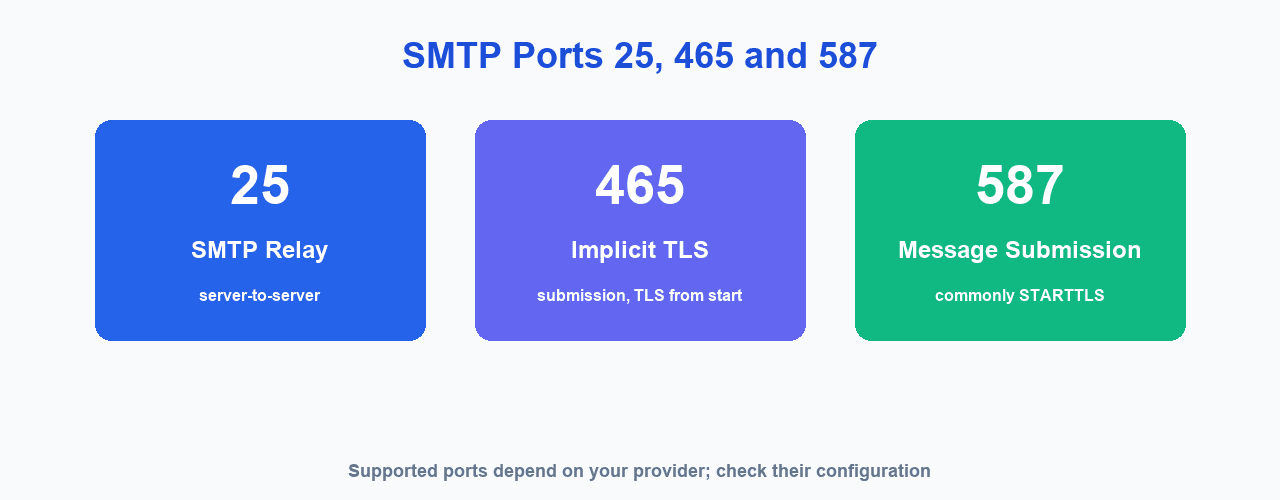
Which SMTP port should I use? It depends on whether you are submitting mail as a client or relaying mail between servers. The table below summarises the three ports you will encounter:
| Port | Typical role | Encryption |
|---|---|---|
| 25 | Server-to-server SMTP relay | Depends on server configuration |
| 465 | Message submission with implicit TLS | TLS |
| 587 | Authenticated message submission | Usually STARTTLS / TLS |
Exact port and encryption requirements depend on your email provider or server configuration — always check the provider's documentation.
What Is SMTP Port 25?
Port 25 is the traditional SMTP relay port used for server-to-server email transport. It is different from message submission, and many networks restrict outbound port 25.
Applications should generally use a provider's submission service rather than attempting arbitrary SMTP relay directly. This is standard practice, not a workaround.
What Is SMTP Port 587?
Port 587 is used for message submission. It is common for email clients and applications, usually paired with STARTTLS and authentication.
The IETF (RFC 6409) specifies message submission normally over port 587. It is commonly recommended for submitting outbound mail because it supports authentication and policy controls appropriate for submission.
What Is SMTP Port 465?
Port 465 is used for SMTP submission over implicit TLS, where encryption begins when the connection starts. This differs from STARTTLS, which upgrades an unencrypted connection.
As an example, Google's current Gmail documentation supports SMTP submission on port 587 with TLS/STARTTLS and on port 465 with SSL. Port 465 is not universally supported, so check provider documentation.
Port 25 vs 465 vs 587
| Port 25 | Port 465 | Port 587 | |
|---|---|---|---|
| Main purpose | Relay | Secure submission | Message submission |
| Typical client use | Rare | Yes | Yes |
| TLS | Provider / config dependent | Implicit TLS | STARTTLS |
| Authentication | Depends | Common | Common |
| Recommended for applications | Usually no | When provider supports it | Common choice |
Provider documentation should always take precedence over general guidance.
SMTP Authentication
What is SMTP authentication? It is the process by which an SMTP server verifies and authorizes the sender before relaying a message. The server confirms the sender is allowed to send mail through it.
- Username — typically the full email address
- Password or app-specific password
- OAuth (e.g. Gmail OAuth 2) where supported
- Authentication mechanisms supported by the server (e.g. PLAIN, LOGIN)
- TLS to protect credentials in transit
Never store SMTP passwords insecurely or expose them to website visitors (see the security section below).
SMTP TLS and SSL
SMTP can be encrypted in transit. Two common terms appear in configuration interfaces:
STARTTLS
The connection can begin without encryption and then upgrade to TLS when the server supports it and it is required. This is the common approach on port 587.
Implicit TLS
TLS is established as soon as the connection begins — the approach used on port 465.
TLS is the modern encryption protocol, while "SSL" is still commonly shown in configuration interfaces even though modern systems should use secure encrypted connections.
In short, SMTP is the base protocol, ESMTP is SMTP with extensions (negotiated via EHLO, such as AUTH and STARTTLS), and SMTPS is SMTP running over an encrypted connection, typically implicit TLS on port 465.
SMTP Authentication vs SPF, DKIM and DMARC
These terms are often confused but describe different layers of email authentication. It is important to keep them distinct:
| Mechanism | What it authenticates |
|---|---|
| SMTP authentication | Authentication between an SMTP client and its SMTP server — verifies the sender is authorized to relay mail. |
| SPF | DNS-based authorization — declares which hosts are authorized to send mail for a domain. |
| DKIM | Cryptographic signature — verifies that the message is associated with the claimed domain and has not been altered. |
| DMARC | Domain-level policy — uses SPF and/or DKIM results to define how receiving systems handle messages that fail authentication. |
SPF, DKIM, and DMARC should never be described as "SMTP authentication" — they are domain-level email authentication mechanisms. Learn more in our guide to SPF, DKIM and DMARC.
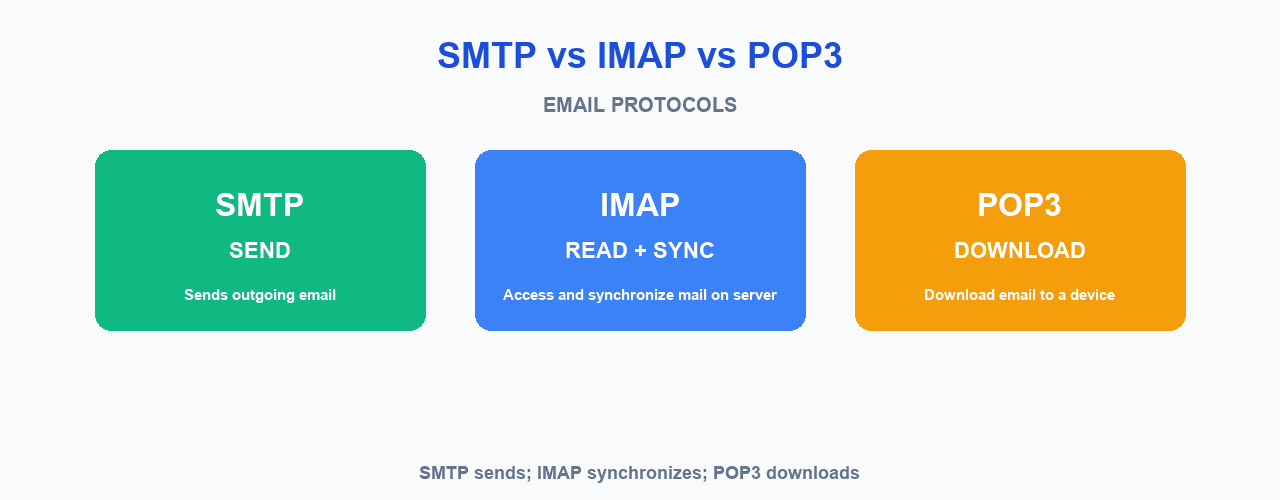
SMTP vs IMAP vs POP3
| Protocol | Main purpose |
|---|---|
| SMTP | Send and relay email |
| IMAP | Access and synchronize email stored on a server |
| POP3 | Retrieve email, traditionally by downloading messages |
In short: SMTP sends, IMAP provides access and synchronization, and POP3 downloads. SMTP is for outgoing mail; IMAP and POP3 are for retrieving mail already in a mailbox.
SMTP vs Email API
What is the difference between SMTP and an email API? Both can send email, but they work at different layers:
| Feature | SMTP | Email API |
|---|---|---|
| Protocol | SMTP | HTTPS |
| Integration | SMTP host / port / credentials | API request |
| Authentication | SMTP authentication | API key / token |
| Best suited for | Mail-server integrations | Application integrations |
| Network connection | SMTP | HTTPS |
| MailCannon | Supported | Supported |
Neither approach is inherently better for deliverability — inbox placement depends on authentication, reputation, content, and recipient engagement regardless of the sending method. MailCannon supports both: you can connect via MailCannon SMTP settings or send through the MailCannon API documentation.
Common SMTP Settings
When configuring an email client or application to send via SMTP, you will typically need the following values — all provided by your email provider:
| Setting | Example |
|---|---|
| SMTP host | smtp.example.com |
| Port | 587 (or 465 for implicit TLS) |
| Encryption | STARTTLS / TLS |
| Authentication | Required |
| Username | your-email@example.com |
| Password | Your SMTP password or app password |
Do not use smtp.example.com as a real host — obtain the correct values from your email provider's documentation.
# This is an EXAMPLE and not a real configuration.
SMTP Host: smtp.example.com
Port: 587
Security: STARTTLS
Username: your-email@example.com
Password: your-secure-credential
Authentication: Required
SMTP Relay, Submission and Response Codes
What Is SMTP Relay?
SMTP relay is the process of transferring a message through a mail server toward its destination. It is distinct from submission (a client sending mail to a server) and from final delivery (a server placing mail in a mailbox).
What Is SMTP Submission?
SMTP submission is when a client or application submits an outgoing message to a submission server. The distinction matters:
- SMTP relay: server-to-server transport.
- SMTP submission: a client/application submits an outbound message.
Per RFC 6409, this separation allows authentication and policy controls appropriate for message submission.
What Is an SMTP Response Code?
SMTP servers return response codes to indicate the status of a command or message transaction. The first digit groups the meaning:
| Code | General meaning |
|---|---|
| 2xx | Success |
| 3xx | Further action required |
| 4xx | Temporary failure |
| 5xx | Permanent failure |
Common examples include 220, 250, 421, 450, 451, 550, and 554. The exact meaning depends on the specific SMTP response.
Common SMTP Errors
- 421 — temporary service or connection problem.
- 450 — temporary mailbox or policy issue.
- 451 — temporary processing problem.
- 452 — insufficient storage on the receiving server.
- 550 — permanent rejection (mailbox not found or policy block).
- 554 — general transaction/message rejection.
For provider-specific examples, Google's SMTP error documentation includes cases of 421, 450, 451, 550, and 554 responses and explains that the response text provides additional context. Do not blindly retry permanent errors. To analyze why messages bounced or were rejected, use MailCannon's Email Bounce Analyzer.
Advertisement
Why Is My SMTP Email Not Sending?
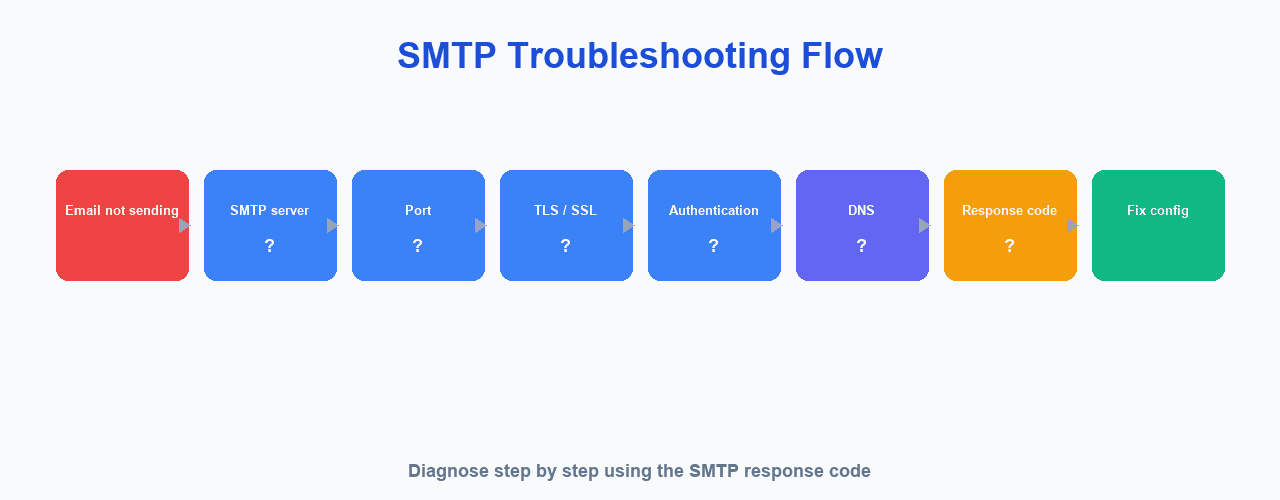
Diagnose the problem systematically by checking:
- SMTP hostname — is it correct and reachable?
- SMTP port — does it match the provider's expected port?
- Username — is the sender address correct?
- Password / API credentials — are they valid and not expired?
- Authentication method — does the server support it?
- TLS / SSL configuration — is encryption configured correctly?
- Firewall / network restrictions — is the port blocked?
- Sender address — is it authorized for this server?
- DNS — are MX and authentication records correct?
- Provider sending restrictions — have you hit a limit?
- SMTP response code — what does the error text say?
- Sender reputation — has the sending domain or IP been flagged?
Common failure signals include authentication failed, invalid credentials, connection refused, timeout, TLS/SSL mismatch, relay denied, sender rejected, recipient rejected, temporary server failure, and blocked SMTP port. SMTP response codes and enhanced status codes can help diagnose the exact cause — always read the full response text rather than only the numeric code.
SMTP and DNS
DNS helps mail systems discover and authenticate sending and receiving infrastructure. This includes:
- MX records — point to the recipient's incoming mail servers
- SPF, DKIM, and DMARC — authenticate senders
- PTR / reverse DNS — helps verify sending IPs
To configure authentication correctly, see our guide to SPF, DKIM and DMARC, and to understand the wider picture read what email deliverability is.
SMTP and Email Deliverability
SMTP is the transport and submission mechanism, but SMTP itself does not guarantee inbox placement. Deliverability also depends on:
- SPF — DNS-based authorization for sending hosts
- DKIM — cryptographic signature verifying message/domain association
- DMARC — domain-level policy using SPF and/or DKIM results
- Sender reputation — standing of the sending domain and IP
- Bounce rate — how often messages are rejected
- List quality — accuracy and permission of recipient addresses
- Message content — subject, body, links, and attachments
- Recipient engagement — opens, clicks, and spam complaints
- Provider policies — rules enforced by receiving mail systems
- DNS configuration — correctness of MX, SPF, DKIM, and DMARC records
To improve yours, follow our 15 best practices for email deliverability, or run a quick Email Deliverability Checker on a draft message before sending.
SMTP for Email Marketing
SMTP is used by email marketing platforms, SaaS applications, websites, CRMs, transactional email systems, and internal business applications. It is important to distinguish between:
- SMTP server: the technical sending infrastructure that transports email.
- Email marketing platform: the software used to manage contacts, campaigns, templates, and sending workflows.
No matter which tool you send through, test the message before you send: check recipients with MailCannon's email verification tool, Email HTML Previewer to review the rendered design, and Email Size Checker to avoid oversized messages.
SMTP vs Email Marketing Platform
| SMTP | Email Marketing Platform |
|---|---|
| Sends / transports email | Manages campaigns |
| Handles SMTP communication | Manages contacts |
| Authentication | Templates |
| Delivery responses | Segmentation |
| Server configuration | Campaign analytics |
| Technical infrastructure | Marketing workflow |
How MailCannon Uses SMTP
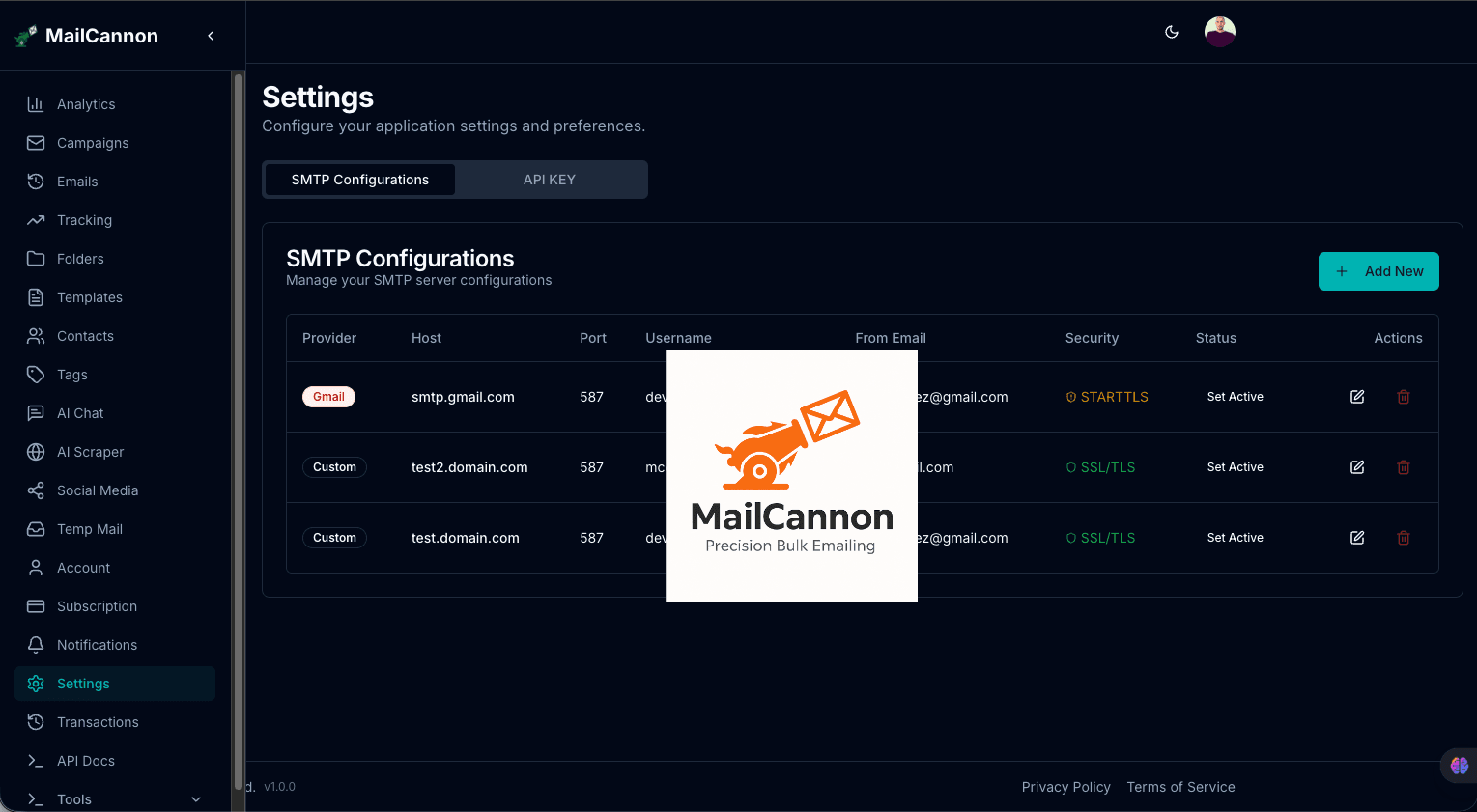
MailCannon provides a campaign-management layer that sits on top of SMTP. You can import and manage contacts from CSV, build HTML email templates, create and manage campaigns — and when it comes to actually sending, you choose how your messages go out: connect your own custom SMTP server, connect Gmail with OAuth 2, or skip SMTP configuration entirely and send through the MailCannon API.
You can manage every sending configuration from MailCannon SMTP settings. The page lists your saved configurations side by side, with the provider, host, port, security mode (STARTTLS or SSL/TLS), and status of each one.
Option 1: Connect Your Own Custom SMTP Server
Select the Custom SMTP provider type and enter your SMTP host, port (587 is the common choice for submission), username, and password, plus the sender name and email address messages should come from. Toggle Use SSL/TLS for an encrypted connection, mark the configuration as active, and save it. Every value comes from your email provider's documentation, exactly as in the configuration example above.
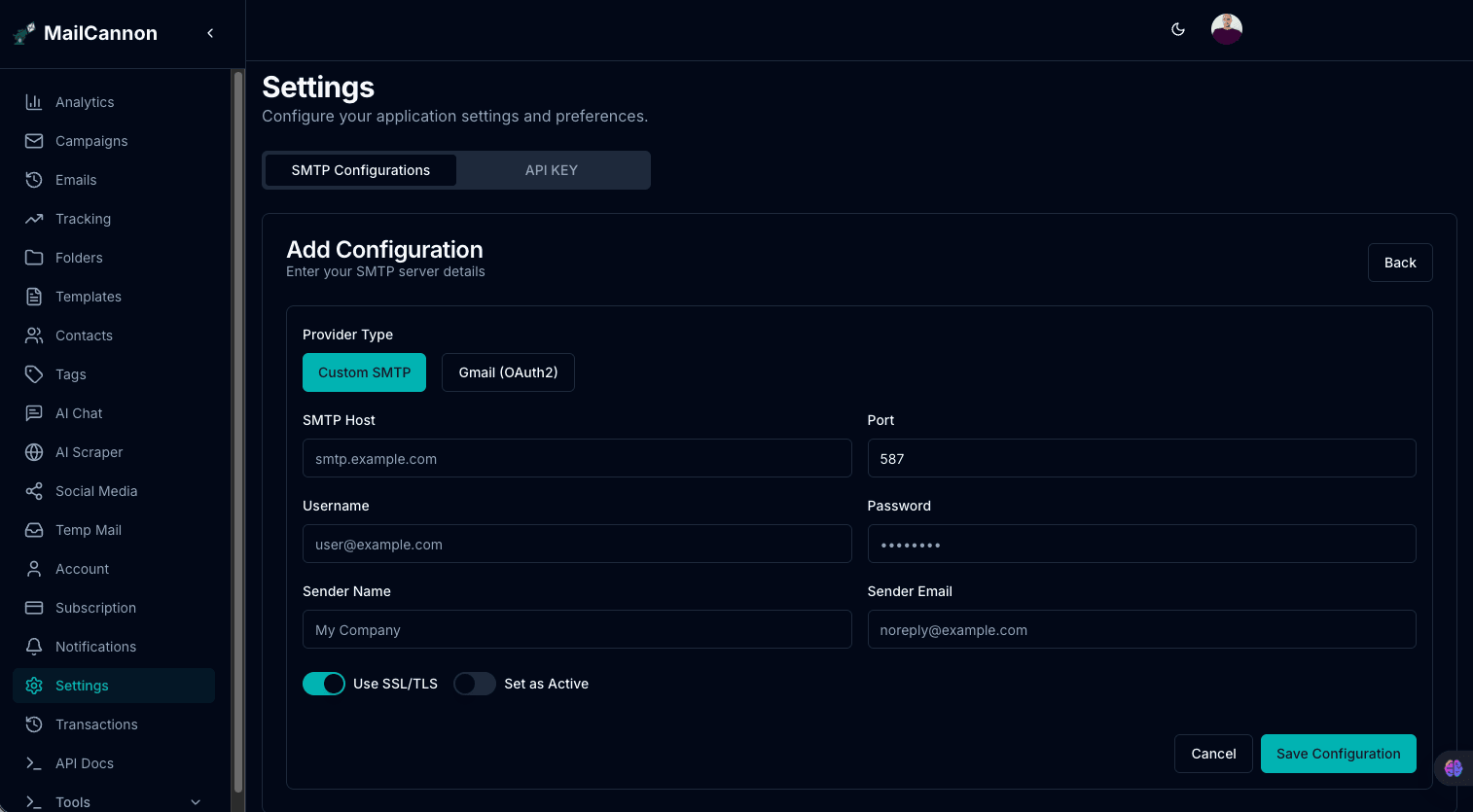
Add your custom SMTP configuration in the MailCannon dashboard
Option 2: Connect Gmail With OAuth 2 (No Password)
If you send from Gmail, you don't need to create an app password or handle SMTP credentials at all. Choose the Gmail (OAuth 2) provider type and click Connect Gmail Account: MailCannon uses OAuth 2 to authorize sending from your Google account securely, so there is no SMTP password to store or rotate.
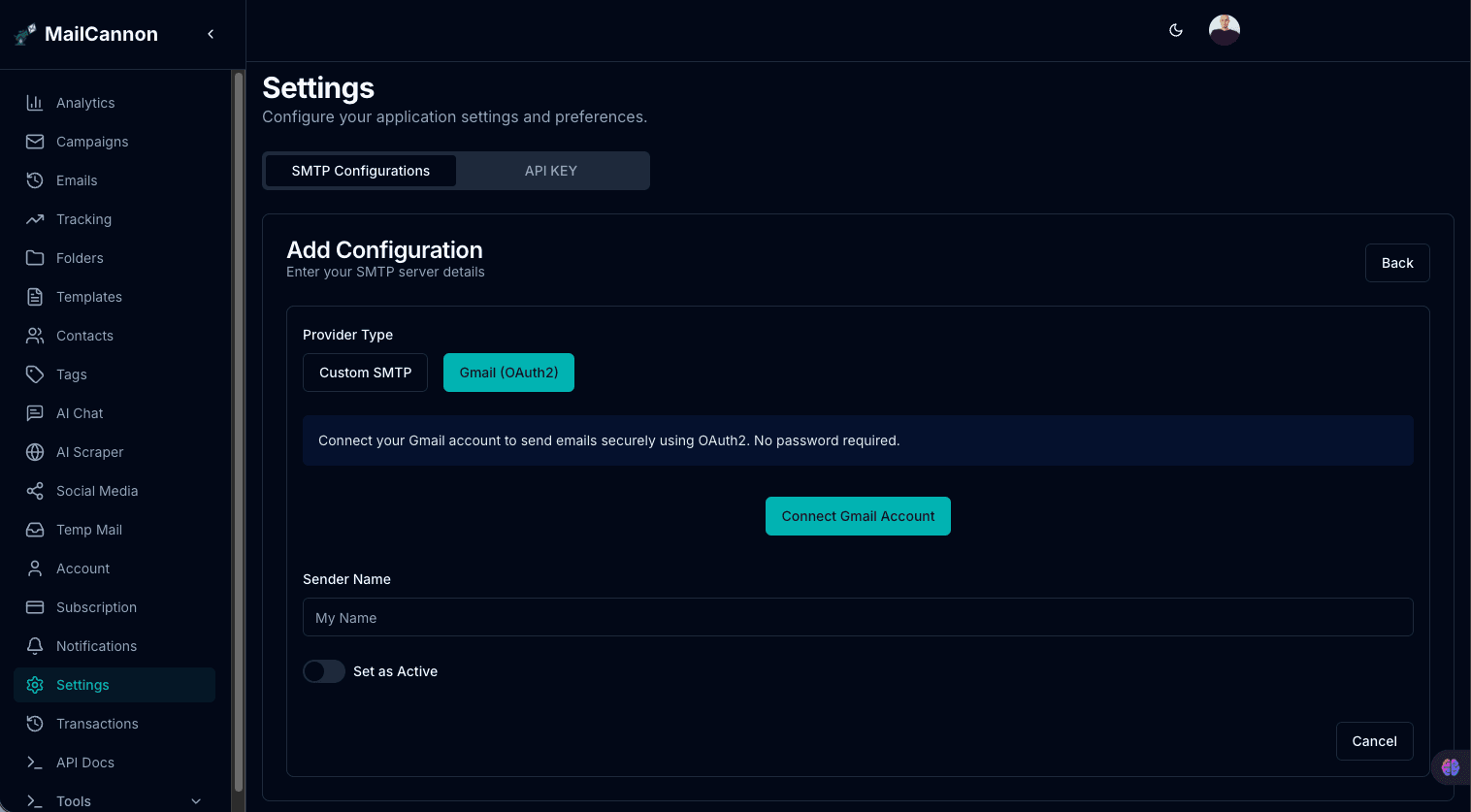
Connect Gmail via OAuth 2 in Dashboard → Settings
Option 3: Send Email Without SMTP Using the MailCannon API
You can also send without configuring any SMTP server. Generate an API key in the API KEY tab of your dashboard settings, then send messages through the MailCannon REST API over HTTPS — no host, port, or SMTP credentials to manage in your application.
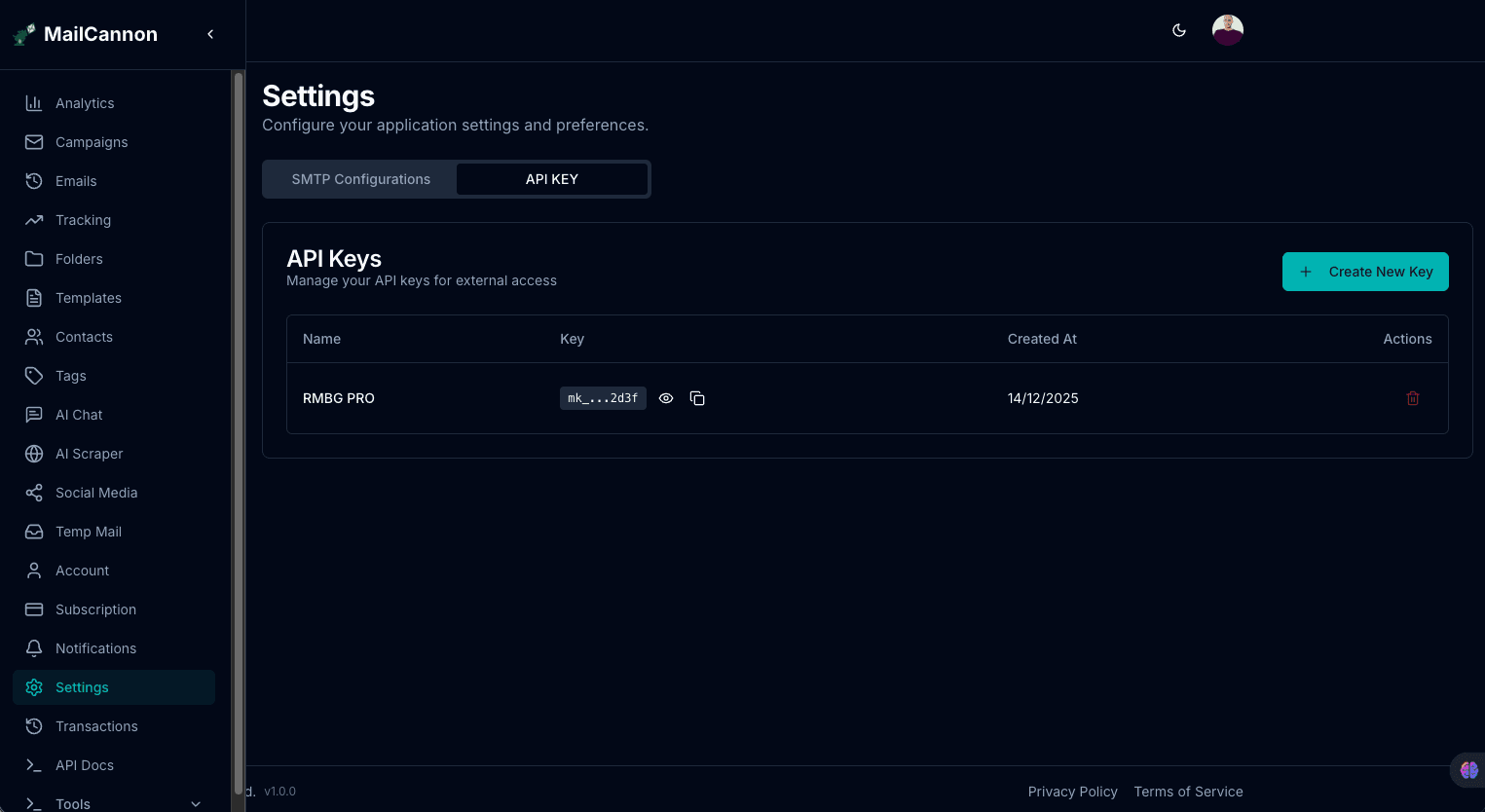
Explore the MailCannon API documentation
In other words, SMTP provides the underlying email-sending mechanism, and MailCannon provides the tools to organize and run your email campaigns using it — with or without an SMTP configuration of your own.
Can You Send Email Without SMTP?
Can I send email without SMTP? Yes — you do not need to configure an SMTP client connection yourself. An HTTP email API lets your application send messages with a simple API request over HTTPS instead of opening an SMTP connection.
With MailCannon, that means:
- No SMTP host, port, or credentials to manage in your application code.
- Authentication via an API key rather than SMTP credentials.
- Sending handled over HTTPS — the same protocol your application already uses.
- Full access to MailCannon's campaign, template, and contact management features.
Generate an API key from MailCannon SMTP settings (API KEY tab) and follow the MailCannon API documentation to get started.
How to Choose an SMTP Server
Evaluate providers on:
- Reliability
- Authentication methods
- TLS support
- Sending limits
- Reputation
- Bounce handling
- Monitoring
- Provider policies
- Documentation
- Pricing
- Geographic availability
SMTP Security Best Practices
- Use TLS where supported — STARTTLS or implicit TLS depending on the port.
- Use strong, unique credentials for each SMTP configuration.
- Never expose SMTP passwords in frontend code or client-side JavaScript.
- Never expose API keys in client-side JavaScript.
- Store credentials securely using environment variables or a secrets manager.
- Restrict access to SMTP configurations to authorized users only.
- Use appropriate SMTP ports as recommended by your provider.
- Configure SPF, DKIM, and DMARC for your sending domain.
- Monitor bounces and delivery problems regularly.
- Rotate credentials when appropriate, especially after team changes.
- Avoid open relay configurations that allow unauthenticated sending.
- Use proper SMTP authentication for every submission.
Important: SMTP credentials should never be placed in client-side JavaScript or exposed to website visitors. Never commit SMTP credentials to Git, and never put them in public environment variables. For Next.js applications, SMTP credentials must remain server-side. Even with correct setup, messages can still be flagged — run a Email Spam Checker before each send to catch potential spam-filter triggers.
Related MailCannon Email Tools
Before or after sending, these tools help you validate, preview, and improve your emails:
- Email Deliverability Checker — test how likely your message is to reach the inbox.
- Email Spam Checker — scan your content for spam-filter triggers.
- Email Bounce Analyzer — understand why a message bounced or was rejected.
- Email HTML Previewer — preview how your HTML email renders.
- Email Size Checker — check whether your message exceeds size limits.
- email verification tool — verify that a recipient address exists.
- AI HTML email generator — generate a responsive HTML email with AI.
Ready to simplify email sending?
Configure your SMTP connection in MailCannon, connect Gmail with OAuth2, or integrate email through the MailCannon API.
Frequently Asked Questions
What does SMTP stand for?
SMTP stands for Simple Mail Transfer Protocol — primarily a sending and submission protocol for email.
What is SMTP used for?
To send email: applications and clients submit messages to an SMTP server, which relays them toward the recipient's mail server.
What is an SMTP server?
A mail server responsible for accepting and relaying outgoing email according to its configuration and policies, including authenticating senders and returning delivery errors.
What SMTP port should I use?
Use port 587 for authenticated message submission with STARTTLS/TLS. Port 465 is for submission with implicit TLS. Port 25 is primarily for server-to-server relay and is often restricted — check your provider's documentation.
What is the difference between SMTP port 25 and 587?
Port 25 is the traditional relay port between mail servers, while port 587 is the standard for message submission from clients and applications with authentication and STARTTLS. Most applications should use port 587.
What is SMTP authentication?
How a mail server identifies and authorizes the sender, typically with a username, password, OAuth, or another mechanism, often over a TLS-encrypted connection.
What is the difference between SMTP and IMAP?
SMTP sends and relays email; IMAP reads and synchronizes email stored on a server.
What is the difference between SMTP and an email API?
SMTP is a mail protocol that communicates over SMTP ports with credentials, while an email API is an HTTPS/JSON interface that lets applications send email via API requests. MailCannon supports both.
Can I send email without configuring SMTP?
Yes — with MailCannon you can send email via the MailCannon API without configuring SMTP or a server of your own.
Why is my SMTP server not sending email?
Likely an incorrect hostname or port, wrong credentials, misconfigured TLS or authentication, network restrictions, DNS issues, provider limits, or an SMTP response code indicating the specific problem.
Is SMTP secure?
Standard SMTP is not encrypted by default, so messages should be protected in transit with TLS (STARTTLS or implicit TLS on port 465) and SMTP authentication. Never expose credentials in client-side code.
Does SMTP guarantee email delivery?
No. SMTP handles submission and transport, but inbox placement also depends on authentication (SPF, DKIM, DMARC), reputation, list quality, engagement, and content.
Conclusion
SMTP is the foundation of email sending. It is the protocol applications use to submit and relay messages toward recipients. Understanding SMTP servers, ports, authentication, and TLS helps you configure sending correctly and troubleshoot problems. To go further, learn about SPF, DKIM and DMARC, how email blacklists affect delivery, and how to improve email deliverability.
Start Your Email Campaigns
Manage contacts, build campaigns, and send marketing email from one dashboard with MailCannon.
Advertisement