Advertisement
SPF, DKIM, DMARC Checker – Email Authentication Lookup
Check SPF, DKIM, DMARC, BIMI, and MTA-STS DNS records for any domain. Free, instant, with setup recommendations. No signup required.
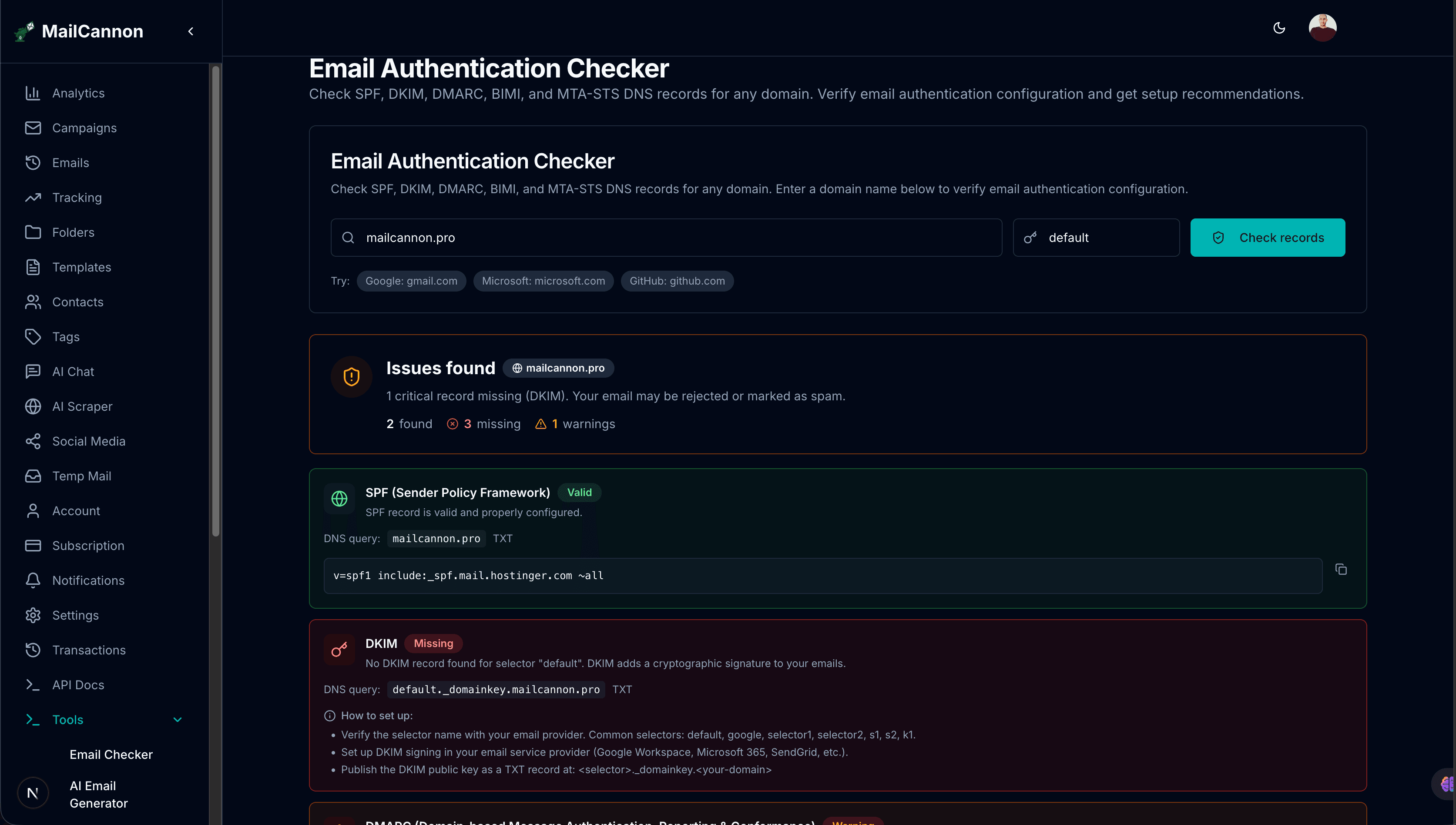
Check your email authentication now
Check Authentication Records →Advertisement
Email authentication is the foundation of deliverability. Without properly configured SPF, DKIM, and DMARC records, your emails are far more likely to land in the spam folder or be rejected entirely. Major providers like Gmail, Outlook, and Yahoo now require SPF and DKIM for bulk senders, and DMARC is increasingly mandatory.
MailCannon.PRO provides a free Email Authentication Checkerthat queries all five critical DNS records in parallel — SPF, DKIM, DMARC, BIMI, and MTA-STS — and gives you instant validation results with specific fix recommendations for each record.
Records We Check
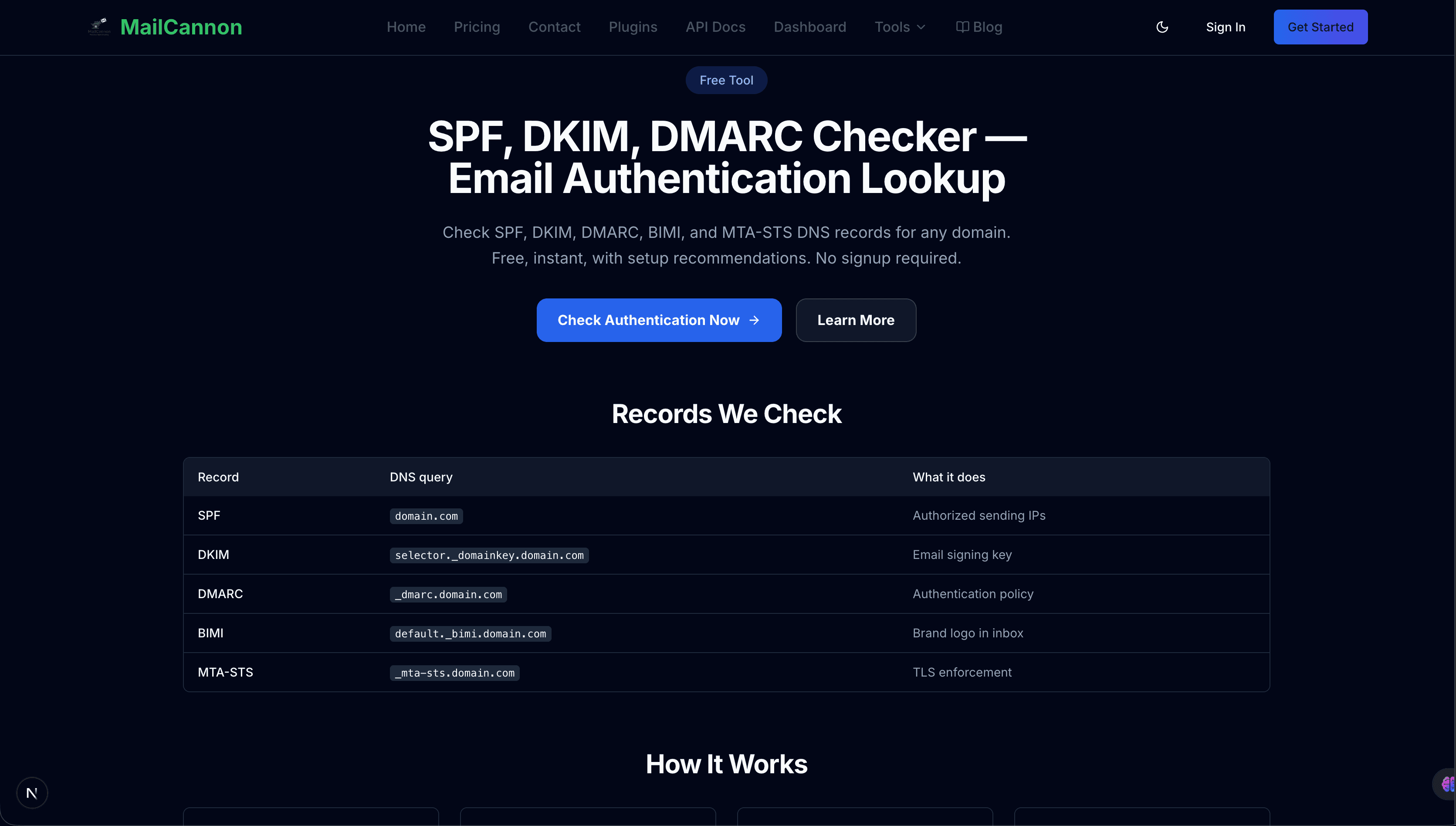
The Email Authentication Checker validates five DNS-based authentication records:
| Record | DNS Query | Purpose | Severity if Missing |
|---|---|---|---|
| SPF | domain.com | Authorized sending IPs | Critical |
| DKIM | selector._domainkey.domain.com | Cryptographic email signing | Critical |
| DMARC | _dmarc.domain.com | Authentication policy & reporting | Critical |
| BIMI | default._bimi.domain.com | Brand logo in inbox | Optional |
| MTA-STS | _mta-sts.domain.com | TLS enforcement for inbound | Optional |
How It Works
- Enter your domain — Type any domain name (e.g.,
example.com) and optionally specify a DKIM selector (defaults to "default"). - Parallel DNS lookups — The tool queries TXT records for all five authentication protocols simultaneously.
- Validate & score — Each record is validated for syntax, common issues, and best practices with severity ratings (Critical, Warning, Info).
- Fix with guidance — Get specific recommendations for each missing or misconfigured record with DNS record examples you can copy.
What the Checker Validates
SPF Validation
- Record exists and starts with
v=spf1 - No
+all(allows anyone to send) or?all(neutral/no protection) - Ends with
~all(softfail) or-all(fail) policy - DNS lookup count under the 10-lookup limit (RFC 7208)
- Detects multiple SPF records (should be merged into one)
DKIM Lookup
- Queries any DKIM selector (default, google, selector1, selector2, s1, s2, k1, or custom)
- Verifies record contains
v=DKIM1or valid key components - Checks public key is present and non-empty (
p=not empty) - Detects revoked keys (empty
p=) - Reports multiple DKIM records for the same selector
DMARC Policy Check
- Record exists and starts with
v=DMARC1 - Policy tag present (
p=none,p=quarantine,p=reject) - Warnings for
p=none(monitor only — upgrade when ready) - Checks for
rua=(aggregate reports) andruf=(forensic reports) - Validates
pct=percentage (should be 100% for full enforcement) - Detects multiple DMARC records
BIMI Readiness
- Checks for
v=BIMI1record atdefault._bimi - Validates logo URL is present (
l=https://) - Guidance on VMC requirements for Gmail and other major providers
- Notes that SPF, DKIM, and DMARC must be aligned first
MTA-STS Enforcement
- Checks for
v=STSv1record at_mta-sts - Validates
id=field is present (unique identifier, e.g., timestamp) - Guidance on publishing the policy file at
https://mta-sts.domain.com/.well-known/mta-sts.txt - Recommends starting with
mode=testingthen switching tomode=enforce
Why Email Authentication Matters
Email authentication is a set of DNS-based protocols that let receiving mail servers verify that an email genuinely comes from the domain it claims to be from. The three core protocols — SPF, DKIM, and DMARC — work together to prevent spoofing, phishing, and impersonation.
Without authentication, your email is far more likely to land in the spam folder or be rejected entirely. Major providers like Gmail, Outlook, and Yahoo now require SPF and DKIM for bulk senders, and DMARC is increasingly mandatory. BIMI and MTA-STS add brand visibility and transport-layer security respectively.
How to Fix Missing Records
- 🌐SPF: Add a TXT record:
v=spf1 include:_spf.google.com ~all. List all your sending providers and end with~allor-all. - 🔑DKIM: Enable DKIM signing in your email provider, then publish the public key as a TXT record at
selector._domainkey.yourdomain.com. - 🛡️DMARC: Add a TXT record at
_dmarc.yourdomain.com:v=DMARC1; p=none; rua=mailto:dmarc@yourdomain.com. Start withp=none, then upgrade. - 📧BIMI: Once SPF, DKIM, and DMARC are aligned, add
v=BIMI1; l=https://yourdomain.com/logo.svgatdefault._bimi.yourdomain.com. - 🔒MTA-STS: Add
v=STSv1; id=20260901at_mta-sts.yourdomain.comand publish a policy file atmta-sts.yourdomain.com.
Email Authentication Checker vs Other Tools
Authentication Checker
Checks DNS records for SPF, DKIM, DMARC, BIMI, and MTA-STS. Validates syntax, configuration, and best practices. This is an infrastructure-level check.
Email Deliverability Checker
Analyzes your email content and configuration before sending — sender information, authentication, HTML, links, images, and content signals. See the Email Deliverability Checker.
Email Spam Checker
Analyzes your email content for signals that may trigger filtering. This is a content-level check. See the Email Spam Checker.
Email Blacklist Checker
Checks external DNSBL databases to see if your IP or domain has already been flagged. See the Email Blacklist Checker.
Use all four together for a complete deliverability picture.
Common SPF Issues and Fixes
- Multiple SPF records: Merge into a single record:
v=spf1 include:_spf.google.com include:spf.sendgrid.net ~all - Uses +all: Replace with
~all(softfail) or-all(fail) immediately - Uses ?all: Provides no protection. Replace with
~allor-all - Missing ~all/-all: Add
~allat the end of your SPF record - Over 10 DNS lookups: Consolidate
include:mechanisms or use IP ranges directly
Common DKIM Issues and Fixes
- No DKIM record found: Enable DKIM in your email provider and publish the public key at the correct selector
- Wrong selector: Verify the selector name with your provider (common: default, google, selector1, selector2, s1, s2, k1)
- Empty public key (p=): The key has been revoked. Re-generate and republish the DKIM key
- Key mismatch: The DNS public key does not match the private key used for signing. Re-publish the correct key
Common DMARC Issues and Fixes
- No DMARC record: Add
v=DMARC1; p=none; rua=mailto:dmarc@yourdomain.com - p=none (monitor only): Upgrade to
p=quarantinethenp=rejectafter reviewing reports - Missing rua (reports): Add
rua=mailto:dmarc@yourdomain.comto receive aggregate reports - Multiple DMARC records: Remove duplicates — only one record allowed at
_dmarc - pct < 100: Increase to
<pct=100once confident in your authentication
MailCannon Email Tools Ecosystem
The Email Authentication Checker is part of a broader set of MailCannon email tools designed to help you create, test, and optimize your emails:
- Email Deliverability Checker — Test emails before sending.
- Email Blacklist Checker — Check DNSBL listings for your domain or IP.
- Email Spam Checker — Check content for spam-risk signals.
- Email Bounce Analyzer — Analyze SMTP bounce messages.
- Email Subject Line Tester — Analyze and improve your subject lines.
- HTML Email Previewer — Preview email rendering on desktop and mobile.
- Email Size Checker — Verify email file size and structure.
- Email Address Checker — Verify if an email address exists.
Frequently Asked Questions
What is SPF, DKIM, and DMARC?
SPF (Sender Policy Framework) lists which IP addresses are allowed to send email from your domain. DKIM (DomainKeys Identified Mail) adds a cryptographic signature to your emails so receivers can verify they have not been tampered with. DMARC (Domain-based Message Authentication, Reporting & Conformance) ties SPF and DKIM together with a policy that tells receivers what to do when authentication fails — reject, quarantine, or monitor.
How do I check my SPF record?
Enter your domain name in the checker above and click "Check records". The tool looks up the TXT record on your domain and verifies it starts with v=spf1, checks for common issues like +all or missing ~all, and counts DNS lookups to ensure you are under the 10-lookup limit.
How do I check my DKIM record?
DKIM records are stored at <selector>._domainkey.<your-domain>. Enter your domain and the DKIM selector (default is "default") in the checker. The tool will look up the TXT record and verify it contains a valid public key (p=). If you do not know your selector, check your email provider documentation — common selectors include default, google, selector1, selector2, s1, s2, and k1.
How do I check my DMARC record?
DMARC records are stored at <_dmarc.<your-domain>. Enter your domain in the checker and the tool will look up the TXT record, verify it starts with v=DMARC1, check the policy (p=none, p=quarantine, or p=reject), and verify that aggregate reporting (rua=) is configured.
What happens if SPF, DKIM, or DMARC is missing?
Without SPF, receivers cannot verify that your sending IPs are authorized, making it easier for spammers to spoof your domain. Without DKIM, emails cannot be cryptographically verified. Without DMARC, receivers have no instructions on how to handle failed authentication. Missing any of these records significantly increases the chance of your email being rejected or sent to the spam folder.
What is BIMI and do I need it?
BIMI (Brand Indicators for Message Identification) displays your brand logo next to your emails in supported inboxes (like Gmail). It requires SPF, DKIM, and DMARC to be properly configured first. BIMI is optional but improves brand recognition and trust. For Gmail, you also need a VMC (Verified Mark Certificate).
What is MTA-STS?
MTA-STS (Mail Transfer Agent Strict Transport Security) enforces TLS encryption for inbound email to your domain, preventing downgrade attacks where email is intercepted and sent over unencrypted connections. It works alongside TLS-RPT to report on TLS connection failures.
Is the email authentication checker free?
Yes. MailCannon email authentication checker is completely free. You do not need to create an account or sign up. Simply enter a domain and click check. Rate limits apply to prevent abuse.
What is the difference between p=none, p=quarantine, and p=reject in DMARC?
p=none means monitor only — no action is taken on failed authentication, but you receive reports. p=quarantine means failed emails are sent to the spam folder. p=reject means failed emails are rejected outright. Start with p=none, review the reports, then upgrade to p=quarantine and eventually p=reject for maximum protection.
How often should I check my email authentication records?
Check your authentication records whenever you change email providers, add new sending services, or modify DNS. For ongoing security, check at least once a month to ensure records have not been accidentally removed or modified. If you notice deliverability drops, check immediately.
Conclusion
Email authentication is the foundation of email deliverability. SPF authorizes your sending servers, DKIM cryptographically signs your messages, and DMARC ties them together with policy and reporting. BIMI adds brand visibility, and MTA-STS enforces transport security.
The MailCannon Email Authentication Checker gives you a free, instant way to verify all five records for any domain, with specific fix recommendations for each. Combine it with the Email Deliverability Checker for pre-send analysis, the Email Spam Checker for content review, and the Email Blacklist Checker for reputation monitoring. For more on authentication, read our guide on SPF, DKIM and DMARC Explained and How to Improve Email Deliverability.
Check Your Email Authentication Now
Run the Email Authentication Checker to verify your SPF, DKIM, DMARC, BIMI, and MTA-STS records instantly, or explore all MailCannon email tools.
Advertisement