Advertisement
Email Blacklist Checker: Is My Email Domain Blacklisted?
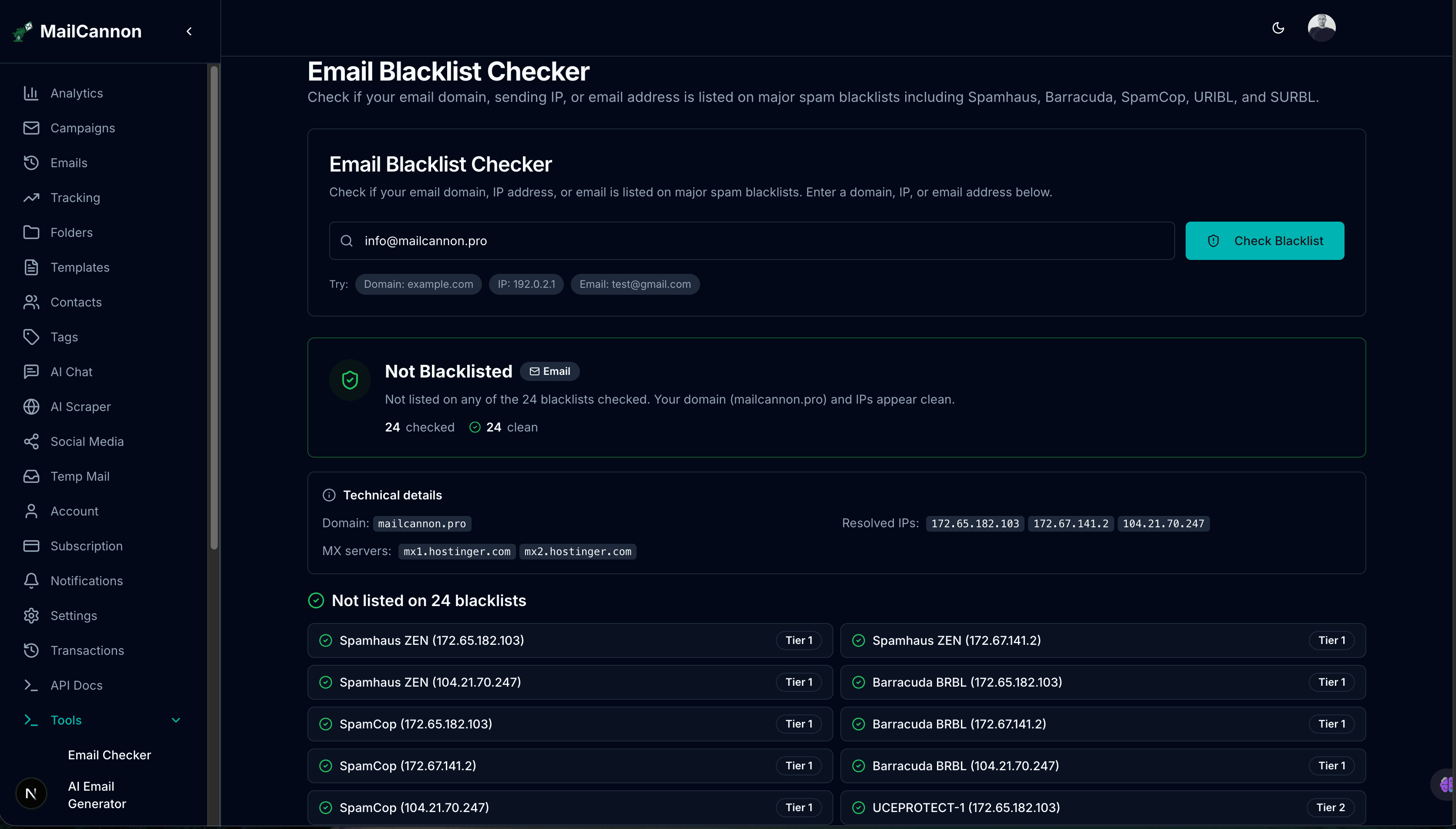
If your emails are bouncing or landing in spam, a blacklist listing could be the reason. The MailCannon Email Blacklist Checker queries multiple DNSBL databases in seconds to tell you whether your domain or IP is listed — free, with no signup required.
Check if your domain or IP is blacklisted
Check Blacklist Status →Advertisement
One of the most common questions email senders ask is: “Is my email domain blacklisted?” When your domain or sending IP appears on a DNSBL (DNS-based Blackhole List), receiving mail servers may reject or filter your messages outright. The result is bounced emails, reduced inbox placement, and damaged sender reputation.
MailCannon.PRO provides a free Email Blacklist Checker that queries major DNSBL databases in parallel and tells you instantly whether your domain or IP is listed. This article explains what email blacklists are, how the checker works, and what to do if you find yourself listed.
What Is an Email Blacklist?
An email blacklist — also called a blocklist or DNSBL — is a database of IP addresses or domains that have been identified as sources of spam, malicious, or unwanted email. Receiving mail servers query these databases in real time when a message arrives. If the sender's IP or domain is listed, the server may reject the message, flag it as spam, or defer delivery.
Blacklists are maintained by independent organizations and security companies. Each operator has its own listing criteria, which can include:
- Spam complaints — recipients marking messages as spam
- Spam traps — sending to addresses planted to catch bad senders
- Malware or botnet activity — IPs associated with malicious infrastructure
- Policy violations — sending from IPs or networks not authorized for email
- Domain reputation — domains used in spam links or phishing campaigns
For a deeper introduction, read our guide on what an email blacklist is.
How the Email Blacklist Checker Works
The MailCannon Email Blacklist Checker performs DNS-based lookups against multiple DNSBL zones. The process is:
Step 1 — Enter Your Domain, IP, or Email
Type your sending domain (e.g. example.com), your sending IP address (e.g. 192.2.50.10), or a sender email address (e.g. newsletter@example.com). The tool auto-detects the input type.
Step 2 — Domain Resolution
If you enter a domain or email, the tool resolves the domain to its mail server (MX) IP addresses. This is the IP that receiving servers see when you send email, so it is the most important to check.
Step 3 — Parallel DNSBL Queries
The tool constructs DNS queries against each blacklist zone. For IP-based checks, it reverses the IP octets and appends the zone name (e.g. 10.50.2.192.zen.spamhaus.org). For domain-based checks, it queries domain-blocklist zones directly.
Step 4 — Results and Interpretation
Each zone returns a result: Listed or Not listed. When listed, the tool also retrieves the TXT record from the blacklist, which often contains a reason code or URL for delisting. Results are organized by severity tier.
Step 5 — Remediation Guidance
For each listing, the tool provides a direct link to the blacklist operator's website and general remediation steps so you know exactly what to do next.
Which Blacklists Does the Checker Query?
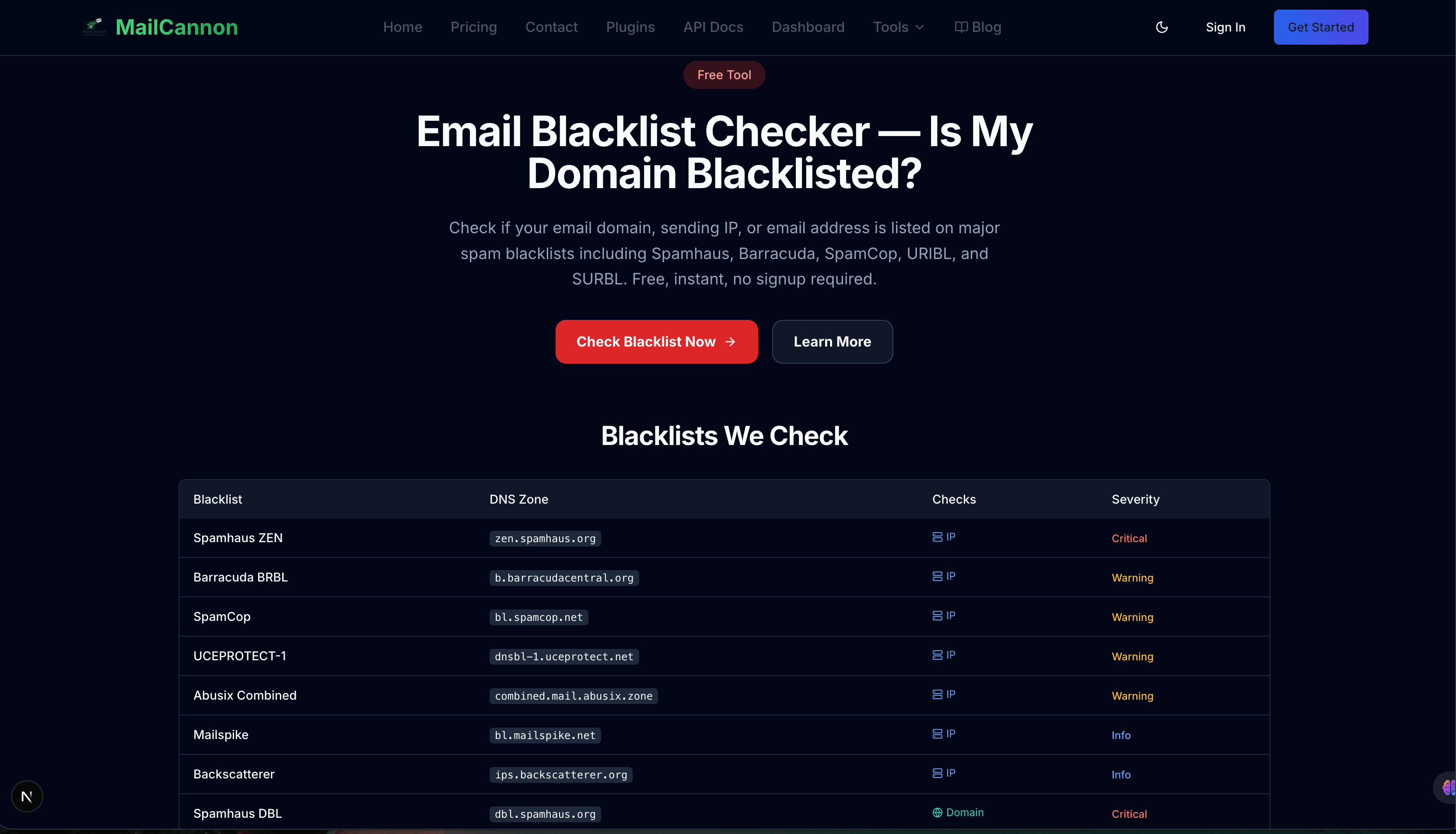
The tool queries DNSBL databases organized into three severity tiers:
Critical Tier (IP-based)
- Spamhaus ZEN — Combines SBL (spam operations), XBL (exploits and malware), and PBL (policy violations). One of the most widely consulted blacklists in the world.
- Barracuda BRBL — Barracuda Reputation Block List. Used by Barracuda firewalls and many enterprise mail systems.
- SpamCop — A reputation-based blacklist driven by spam complaints from recipients.
Warning Tier (IP-based)
- UCEPROTECT Level 1 — Lists individual IPs. Level 1 listings auto-expire, typically within a week.
- Abusix Mail Abuse DB — Community-fed database of IPs reported for email abuse.
- Mailspike — Reputation system that lists IPs with repeated spam patterns.
Informational Tier (IP-based)
- Backscatterer — Lists IPs that generate bounce messages (backscatter) for non-existent recipients.
Domain-based Blacklists
- Spamhaus DBL — Domain Block List. Lists domains used in spam payloads, phishing, or malware.
- SURBL — Lists domains that appear in spam message bodies as links.
- URIBL — Lists domains appearing in spam based on URI data.
Why Being Blacklisted Matters
A blacklist listing can have immediate and cascading effects on your email program:
- Bounced emails — Receiving servers reject messages outright with 5xx SMTP errors.
- Spam folder placement — Even if not rejected, messages may be filtered to spam.
- Reduced engagement — Fewer opens and clicks because messages never reach the inbox.
- Reputation damage — Bounces and low engagement feed back into sender reputation, worsening the cycle.
- Campaign delays — You must pause campaigns, investigate, and request delisting before resuming.
- Revenue impact — For businesses that rely on email for transactional or marketing communication, blacklisting directly affects revenue.
Common Causes of Blacklisting
High Complaint Rates
If recipients mark your emails as spam frequently, complaint-driven blacklists like SpamCop will list your IP. This often happens with purchased lists, aggressive sending, or content recipients do not expect.
Spam Traps
Spam traps are email addresses planted by blacklist operators. Sending to them indicates poor list hygiene. If your list contains recycled, purchased, or scraped addresses, you risk hitting traps.
Compromised Accounts
If a user account on your mail server is compromised and sends spam, the server IP may be listed. This is common with weak passwords or exploited web applications.
Policy Violations (PBL)
Spamhaus PBL lists IPs that should not be sending direct mail — for example, residential or dynamic IP ranges. If your mail server is on a consumer ISP connection, it may be listed.
Malware and Exploits (XBL)
If your server IP is associated with malware command-and-control, open relays, or exploit attempts, it will be listed on XBL. These are serious security issues that require immediate remediation.
Backscatter
Generating bounce messages for non-existent recipients (backscatter) can get you listed on the Backscatterer blacklist. This often happens when your server accepts all email and then bounces invalid recipients.
How to Fix a Blacklist Listing
1. Identify the Blacklist and Reason
Use the Email Blacklist Checker results to see which zone listed you. The TXT record returned often contains a URL or reason code. Visit the operator's website for specific details.
2. Address the Root Cause
Before requesting delisting, fix the underlying issue:
- Remove spam complaints by improving list quality and sending relevant content
- Clean your list using the Email Address Checker
- Secure compromised accounts with strong passwords and 2FA
- Move your mail server off consumer IP ranges or use a reputable SMTP relay
- Configure your server to reject invalid recipients instead of generating backscatter
- Review and fix authentication with SPF, DKIM and DMARC
3. Request Delisting
Visit the blacklist operator's website and follow their delisting process. Some operators allow self-service removal; others require a manual review. Be honest about what happened and what you fixed.
4. Monitor and Prevent Recurrence
After delisting, check regularly to catch future listings early. Combine blacklist monitoring with good sending practices: clean lists, authentication, relevant content, and gradual volume ramping.
Email Blacklist Checker vs Email Deliverability Checker
These two tools serve different but complementary purposes:
Email Blacklist Checker
Checks whether your domain or IP is listed on external DNSBL databases. This answers the question “Is my email domain blacklisted?” Use it when you experience bounces or sudden deliverability drops.
Email Deliverability Checker
Analyzes your email content and configuration before sending — sender information, authentication, HTML, links, images, and content signals. See the Email Deliverability Checker.
Use both together for a complete picture.
Check your blacklist status first to rule out blocking issues, then use the Deliverability Checker to find content and configuration problems before sending.
Email Blacklist Checker vs Email Spam Checker
Blacklist Checker
Checks external databases to see if your IP or domain has already been flagged. This is an infrastructure-level check.
Spam Checker
Analyzes your email content for signals that may trigger filtering. This is a content-level check. See the Email Spam Checker.
How to Prevent Blacklisting
- Authenticate your sending domain with SPF, DKIM, and DMARC.
- Keep your recipient list clean and remove hard bounces immediately.
- Never purchase or scrape email lists.
- Verify addresses before sending with the Email Address Checker.
- Send relevant, expected content that recipients want.
- Include a clear, working unsubscribe mechanism in marketing emails.
- Ramp up sending volume gradually on new IPs to build reputation.
- Monitor complaint rates and remove complainers from your list.
- Secure your mail server with strong passwords and 2FA.
- Use a reputable SMTP relay or email service provider for high-volume sending.
- Monitor your blacklist status regularly with the Email Blacklist Checker.
- Run the Email Deliverability Checker before large campaigns.
Example Workflow: Diagnosing Sudden Bounces
Imagine you send a newsletter and notice a spike in bounce notifications. Here is how to diagnose and fix the problem:
- Run the Email Blacklist Checker with your sending domain.
- Discover your IP is listed on Spamhaus ZEN (PBL component).
- Check the TXT record — it indicates you are on a dynamic/residential IP range.
- Realize your new VPS provider assigned you a previously residential IP block.
- Switch to a dedicated IP or use an SMTP relay service.
- Request delisting from Spamhaus after the IP change.
- Re-run the Blacklist Checker to confirm the listing is gone.
- Run the Email Deliverability Checker to verify content and authentication.
- Resume sending with confidence.
MailCannon Email Tools Ecosystem
The Email Blacklist Checker is part of a broader set of MailCannon email tools designed to help you create, test, and optimize your emails:
- Email Deliverability Checker — Test emails before sending.
- Email Blacklist Checker — Check DNSBL listings for your domain or IP.
- Email Spam Checker — Check content for spam-risk signals.
- Email Bounce Analyzer — Analyze SMTP bounce messages.
- Email Subject Line Tester — Analyze and improve your subject lines.
- HTML Email Previewer — Preview email rendering on desktop and mobile.
- Email Size Checker — Verify email file size and structure.
- Email Address Checker — Verify if an email address exists.
Frequently Asked Questions
How do I check if my email domain is blacklisted?
Use the MailCannon Email Blacklist Checker. Enter your domain, IP, or email address. The tool queries multiple DNSBL databases and reports whether you are listed.
What does it mean if my email domain is blacklisted?
It means a DNSBL operator has flagged your domain or IP as a source of spam or suspicious email. Receiving servers that consult that blacklist may reject or filter your messages.
Is the Email Blacklist Checker free?
Yes. The MailCannon Email Blacklist Checker is free to use with no account or signup required.
Which blacklists does the tool check?
The tool checks major DNSBLs including Spamhaus ZEN, Barracuda BRBL, SpamCop, UCEPROTECT, Abusix, Mailspike, Backscatterer (IP-based), and Spamhaus DBL, SURBL, URIBL (domain-based).
How do I remove my domain from an email blacklist?
Visit the blacklist operator's website shown in your results, follow their delisting process, and fix the underlying cause before requesting removal.
How long does it take to be removed from a blacklist?
It depends on the operator. Some listings auto-expire within hours or days. Manual delisting requests can take hours to several days.
Can I check an IP address for blacklisting?
Yes. The tool accepts IP addresses directly and queries all IP-based DNSBL zones.
What is a DNSBL?
A DNSBL is a DNS-based Blackhole List — a database of IPs or domains linked to spam. Mail servers query DNSBLs via DNS to decide whether to accept or reject email.
Why is my email going to spam even though I am not blacklisted?
Blacklisting is only one cause of spam placement. Other factors include missing SPF, DKIM, or DMARC, low sender reputation, high complaint rates, and content-based filtering. Use the Email Deliverability Checker for a broader analysis.
How often should I check my blacklist status?
Check before large campaigns, after bounce spikes, or when you notice deliverability dropping. Regular monitoring helps catch listings early.
Conclusion
Being blacklisted is one of the most damaging things that can happen to your email program, but it is also one of the most diagnosable. The MailCannon Email Blacklist Checker gives you a free, instant way to answer the question “Is my email domain blacklisted?” and tells you exactly which DNSBL has listed you.
Combine regular blacklist monitoring with the Email Deliverability Checker for pre-send analysis, the Email Spam Checker for content review, and good authentication practices ( SPF, DKIM, DMARC) for a robust deliverability strategy. For more on blacklists, read our guide on what an email blacklist is and how to improve email deliverability.
Ready to Check Your Blacklist Status?
Run the Email Blacklist Checker to see if your domain or IP is listed on any DNSBL, or explore all MailCannon email tools.
Advertisement