Advertisement
How to Send Bulk Emails Without Going to Spam
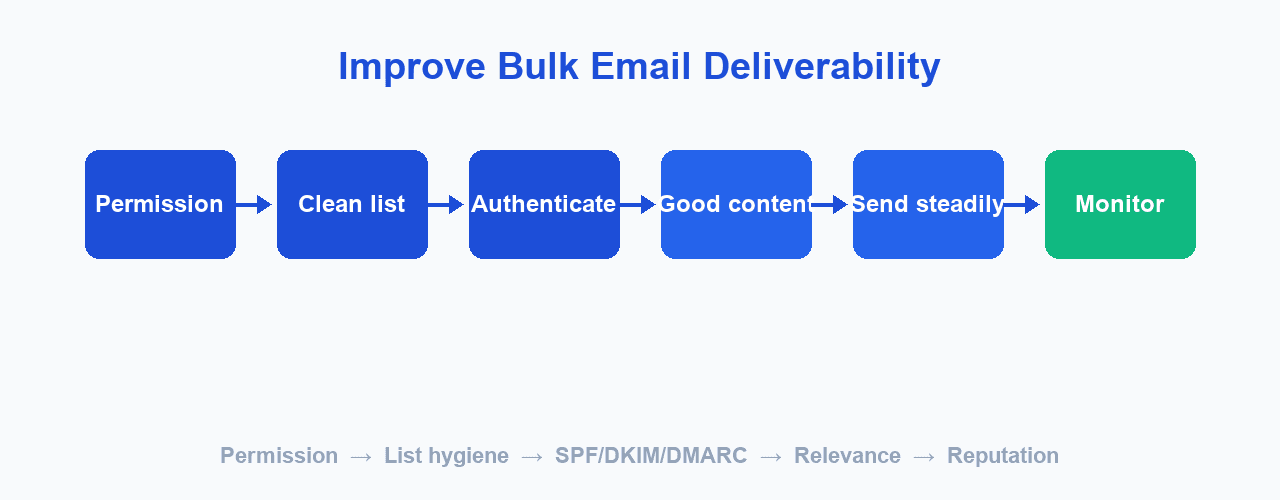
The best way to send bulk emails without going to spam is to send to people who gave permission, keep your list clean, authenticate your sending domain with SPF, DKIM, and DMARC, write relevant emails, control your sending volume, and monitor your results. No service can guarantee that every email reaches the inbox, but these practices maximize legitimate delivery. In this guide, we explain why bulk email goes to spam, how spam filters work, and how to send campaigns responsibly.
Why Do Bulk Emails Go to Spam?
Spam filters try to protect recipients from unwanted mail. They look at many signals and decide whether a message looks legitimate or not. Bulk emails commonly end up in spam for several reasons:
- Sending to people who did not opt in
- Purchased or scraped email lists
- High bounce rates
- Spam complaints
- Poor sender reputation
- Misleading subject lines
- Poor or thin email content
- Excessive or sudden sending volume
- Missing authentication records
- Incorrect DNS configuration
- Suspicious or non-matching links
- Poorly built HTML
- No clear unsubscribe mechanism
- Sudden, unexplained changes in sending behavior
Spam filtering is based on multiple signals working together, not one single factor. A legitimate sender can still trip a filter if several signals are weak at once, so the goal is to keep every part of your setup healthy.
Can You Guarantee That Bulk Emails Will Reach the Inbox?
No. No legitimate method can guarantee that every bulk email reaches the inbox. Here is why:
- Gmail, Outlook, and other providers run their own filtering systems.
- Filtering decisions can change over time.
- Your sender reputation matters.
- Recipient engagement matters.
- Authentication matters.
- Content matters.
The goal of good email marketing is to maximize legitimate delivery and minimize the chance of spam placement — not to bypass or evade spam filters. Focus on being a trustworthy sender that recipients want to hear from.
Use Permission-Based Email Lists
Permission is the foundation of email deliverability. When someone knows what they signed up for, they are more likely to open, engage, and not report your email as spam. Common ways to collect permission include:
- Opt-in subscription forms on your website
- Double opt-in confirmation (an extra step after signing up)
- Clear consent statements explaining what subscribers will receive
- Existing customer relationships, where appropriate
Purchased, scraped, or harvested lists are risky because the people on them never agreed to hear from you. They raise complaints, damage your reputation, hurt deliverability, and may create legal compliance problems. For the same reason, you should never send unsolicited campaigns or use leaked databases.
Keep Your Email List Clean
List hygiene keeps your deliverability healthy. A clean list means:
- Remove invalid addresses.
- Monitor hard bounces and remove the addresses that cause them.
- Handle soft bounces and retry, but watch for repeated failures.
- Remove addresses that consistently fail.
- Monitor inactive subscribers and re-engage or remove them.
- Handle unsubscribes immediately.
- Avoid repeatedly emailing addresses that keep failing.
It helps to understand the two main types of bounces:
Hard bounce: a permanent delivery failure, usually because the address does not exist or the domain is invalid. These addresses should be removed.
Soft bounce: a temporary delivery problem, such as a full inbox or a temporary server issue. These may succeed on a later attempt, but consistent soft bounces still deserve attention.
Authenticate Your Sending Domain
Email authentication helps receiving providers verify that your email really comes from you and was not altered in transit. The three main mechanisms are SPF, DKIM, and DMARC:
| Technology | Main purpose |
|---|---|
| SPF | Authorizes which servers are allowed to send email for your domain |
| DKIM | Adds a cryptographic signature that verifies the email was not altered |
| DMARC | Defines how receiving providers should handle authentication failures and provides reporting |
These mechanisms help providers recognize a legitimate email source. They are an important part of deliverability, but they do not guarantee inbox placement on their own. You still need permission, clean lists, and relevant content.
Build a Good Sender Reputation
Sender reputation is how email providers judge whether your mail is trustworthy. It is shaped by many factors:
- Bounce rate
- Spam complaints
- Recipient engagement (opens and clicks)
- Consistency of sending volume
- Domain reputation
- IP reputation
- Authentication
- Recipient behavior
A good reputation is built over time through consistent, responsible sending. It is hard to rebuild once damaged, so protecting a healthy reputation is easier than repairing a poor one.
Don't Suddenly Send a Huge Volume
A sudden, massive spike in sending volume can look suspicious to providers and hurt your reputation. Better practices include:
- Keep a consistent sending pattern.
- Increase volume gradually when appropriate.
- Monitor results as you grow.
- Avoid launching an unexpectedly massive campaign with no ramp-up.
This is about responsible sending, not about hiding activity or evading provider limits. Steady, predictable sending gives providers signals that your mail is expected and wanted.
Advertisement
Write Emails That People Actually Want to Receive
Relevant, well-written email is far less likely to be marked as spam. Aim for:
- A clear subject line
- An honest, recognizable sender identity
- Content that matches what subscribers signed up for
- Useful information, not just promotion
- A clear call to action
- A reasonable amount of promotional content
- A good balance of text and images
- Professional, clean formatting
Misleading subject lines damage trust and engagement. If readers open an email and find something unrelated, they are more likely to ignore or report it, which harms your results and reputation over time.
Avoid Spammy Email Practices
Here is a practical checklist of behaviors to avoid:
- Fake urgency or pressure
- Misleading subject lines
- Excessive capitalization
- Excessive punctuation
- Deceptive or mismatched links
- Hidden text
- Content unrelated to the subject line or the signup promise
- Fake "Re:" or "Fwd:" prefixes
- Image-only emails with little text
- Unnecessary attachments
- Sending to people who never subscribed
Bear in mind that individual words alone do not determine whether an email goes to spam. Modern filtering systems consider the whole context and many signals together.
Always Include an Unsubscribe Option
Every marketing email should make it easy for someone to leave:
- A clear, visible unsubscribe link
- An easy way to opt out
- Prompt removal from marketing campaigns
- Preference management when available
Making unsubscribing easy is both good practice and, depending on the jurisdiction and the type of message, often a legal requirement. Email marketing laws vary by country and jurisdiction, so check the rules that apply to you and your recipients rather than relying on general advice.
Test Your Email Before Sending It to a Large List
Testing catches mistakes before they reach your whole audience. Before a big campaign, check:
- The subject line
- Links
- Images
- Mobile rendering
- Sender information
- Personalization
- The unsubscribe link
- Spelling
- Authentication
- A test email to confirm everything works
Testing reduces mistakes that lower engagement or lead recipients to mark mail as spam, so it is worth the few extra minutes.
Monitor Your Email Campaign Metrics
To understand your deliverability, track these metrics:
- Delivery rate
- Bounce rate
- Hard bounce rate
- Soft bounce rate
- Open rate
- Click-through rate
- Spam complaints
- Unsubscribe rate
- Conversion rate
Open rates are imperfect because of privacy protections and tracking limitations: many recipients block tracking images, and some mail clients prevent open counting entirely. Treat open rate as one helpful signal, not a perfect measure of engagement.
What Is a Good Email Deliverability Rate?
There is no single number that is "guaranteed good" for every business. What is healthy depends on your industry, audience, and sending history. Instead of chasing one benchmark, monitor trends and watch for problems:
- Delivery failures
- Bounce trends
- Complaint rates
- Engagement
- Provider-specific performance
A rising bounce rate or complaint rate is a warning sign regardless of the absolute number. Track your own results over time and compare them with reputable, current sources if you use benchmarks.
Bulk Email vs Spam: What's the Difference?
Bulk email is not inherently spam. The difference comes down to permission, relevance, sender identity, user expectations, sending practices, and compliance. Here are two clear examples:
Legitimate bulk email: a subscriber voluntarily signs up for a newsletter and receives it as promised. The email is relevant, identifies the sender, and includes an easy way to unsubscribe.
Unwanted spam: a person receives unsolicited marketing emails they never requested, often from an unknown source, with no honest way to opt out.
How to Send Bulk Emails Responsibly with MailCannon
MailCannon is an email marketing platform that helps you organize and send legitimate email campaigns. It provides tools for:
- Importing and managing contacts
- Building and organizing contact lists
- Creating HTML email templates
- Managing campaigns
- Configuring SMTP sending
- Sending campaigns
- Monitoring campaign results
You can use MailCannon to organize your contacts and manage your email marketing campaigns from one dashboard. As with any platform, the sender remains responsible for recipient permission, list quality, content, compliance, and domain configuration. MailCannon assists with the mechanics of sending, but a legitimate, well-maintained list is always up to you.
Bulk Email Checklist
☐ Recipients have permission
☐ Email list is clean
☐ Sender domain is authenticated
☐ SPF is configured
☐ DKIM is configured
☐ DMARC is configured
☐ Subject line is accurate
☐ Email content is relevant
☐ Links work
☐ Unsubscribe link works
☐ Test email completed
☐ Sending volume is appropriate
☐ Campaign metrics will be monitored
Frequently Asked Questions
How can I send bulk emails without going to spam?
Send to people who gave permission, keep your list clean, authenticate your domain with SPF, DKIM, and DMARC, write relevant emails, control your volume, include an unsubscribe link, and monitor your results. No method guarantees the inbox, but these practices maximize legitimate delivery.
Is bulk email always considered spam?
No. Bulk email becomes spam when it is sent without permission, is irrelevant, or misrepresents the sender. Legitimate bulk email goes to recipients who opted in.
Can I send bulk emails from Gmail?
Free providers like Gmail restrict bulk sending and throttle accounts that send large volumes. For serious bulk email, use an email marketing platform or a dedicated SMTP service. Provider limits and policies can change, so check the latest guidance.
How many emails can I send at once?
There is no single universal limit. Sending at a steady, consistent volume and increasing gradually while monitoring bounces and complaints is safer than a sudden massive batch.
Why do my bulk emails go to spam?
Common reasons include sending to people who did not opt in, high bounces, complaints, missing authentication, sudden volume spikes, misleading subject lines, and poor content. Filters weigh many signals together.
Does SPF prevent emails from going to spam?
SPF helps providers verify that a message came from an authorized server, which supports deliverability, but it does not guarantee inbox placement on its own.
Do DKIM and DMARC improve deliverability?
Yes. DKIM verifies the message was not altered, and DMARC defines handling for failed authentication and provides reporting. Together with SPF they establish that you are a legitimate sender and support better deliverability.
Should I buy an email list?
No. Purchased lists contain people who never agreed to hear from you. They cause high bounces, complaints, poor reputation, and deliverability problems, and can create legal compliance issues.
How do I reduce email bounce rates?
Keep your list clean, remove invalid and hard-bouncing addresses, limit retries to addresses that keep failing, confirm new signups, and never buy or scrape lists.
How can I improve my sender reputation?
Send only to permission-based recipients, keep rejection and complaint rates low, maintain consistent volume, authenticate your domain, and engage subscribers with relevant content. Reputation builds over time through many signals.
Conclusion
Sending bulk email without going to spam comes down to responsible, legitimate practice: build a permission-based list, keep it clean, authenticate your domain, write relevant email, send at a steady pace, and monitor your metrics. No provider can guarantee inbox placement, but these habits give you the best chance of reaching the people who want to hear from you.
If you are new to email marketing, start with our guide explaining what email marketing is and how it works. To manage your contacts and build campaigns, MailCannon provides the tools to manage your email contacts and create email templates in one place.
Send Bulk Email Responsibly
Manage contacts, build campaigns, and send marketing email with proper tools from one dashboard.
Advertisement