Advertisement
SMTP Ports Explained: 25, 465, 587 and 2525
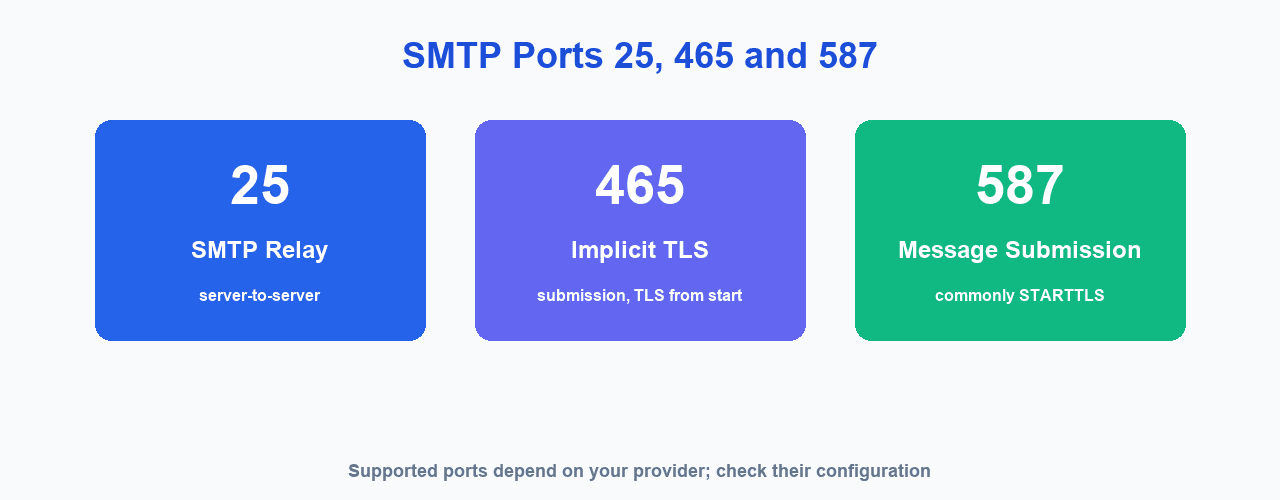
SMTP uses four ports you will meet in practice, and only one of them is the right default for sending mail from an application. Use 587 with STARTTLS for authenticated sending, 465 when your provider wants the connection encrypted from the first byte (implicit TLS, also called SMTPS), 25 for relay between mail servers, and 2525 as a fallback when a network blocks 587.
What an SMTP port is
A port is a numbered channel on a server. When an email client, a script or a backend service opens a connection to a mail server, it has to choose one of the 65,535 available ports, and the number it picks tells the receiving server what kind of conversation is about to start. Port 25 announces mail transport between servers, port 587 announces authenticated submission from a user or an application, and port 465 announces an already encrypted submission session. The address matters as much as the number: you connect to a specific host such as smtp.gmail.com on a specific port.
Because the port number carries meaning, providers accept connections on a documented set of ports and refuse the rest. That is why the wrong port rarely produces a slow connection or a partial transfer: the handshake fails immediately with a connection refused, a timeout or a rejection message. Encryption is negotiated separately from the port in one case and is implied by the port in the other, which is the main source of confusion in this topic.
The four ports in practice
These are the ports you will actually see in the settings of an email client, an application or a transactional email provider.
| Port | Encryption | What it is for | Should you use it for sending? |
|---|---|---|---|
| 25 | None, optionally STARTTLS | Relay between mail servers | No. Most ISPs and cloud hosts block outbound 25 to fight spam. |
| 587 | STARTTLS | Authenticated submission from an app or client | Yes. This is the default choice. |
| 465 | Implicit TLS (also called SMTPS) | Submission where TLS starts before any SMTP command | Yes, when your provider offers it. |
| 2525 | STARTTLS | Unofficial alternative, widely allowed | Only as a fallback when 587 is blocked. |
The encryption column deserves a note, because client menus label these options inconsistently. Port 465 is often listed as "SSL" and port 587 as "TLS", but both end up running TLS: the label describes when encryption begins, not which protocol is used. Port 25 is a different case altogether, since it carries transport between servers rather than submission, and opportunistic STARTTLS there is a courtesy between mail servers rather than a guarantee. Providers publish what they accept, and a port that answers is not automatically a port you are allowed to use for submission.
How to choose a port
Start with 587 and authenticated submission with STARTTLS. It is the documented default for sending mail on behalf of a user, every serious provider supports it, and virtually every library treats it as the normal case. If your provider also publishes port 465 for implicit TLS and your client has a dedicated SSL/TLS mode, that is an equally valid choice and often the better one for applications that never wanted a plain-text moment in the first place.
Reach for 2525 only when the network you are on blocks 587. It is an unofficial port with no standards document behind it, so treat it as a workaround rather than a configuration you design around. And if 587 already works, leave it alone: changing the port on a working setup adds a new failure mode without improving anything.
Whatever you pick, keep it in one place. Hard-coding a port in three files is how a provider migration turns into a week of debugging, and logging the host, port and encryption mode on connection failure saves you from guessing later. Note also that the credentials are separate from all of this: some providers, Amazon SES among them, issue an SMTP username that is not your mailbox address, and that has nothing to do with which port you chose.
STARTTLS versus implicit TLS
On port 587 the connection opens in plain text and then upgrades. The client sends the STARTTLS command, the server accepts, and both sides perform a TLS handshake before any credentials or message content are exchanged. This is called opportunistic or explicit encryption: the upgrade happens inside the same session, and a server that does not offer it would leave you talking in the clear unless your client insists on the upgrade.
On port 465 there is no plain-text phase at all. The TLS handshake begins as soon as the TCP connection is established, before any SMTP command is sent, which is why it is called implicit TLS. Both arrangements are acceptable and both protect your credentials in transit. The practical difference shows up in error messages and in configuration: a client misconfigured for STARTTLS on port 465 will look as though it is waiting for a welcome banner that never arrives in readable form, while a client set to implicit TLS on port 587 will report a handshake failure on a socket the server considers plain text.
Typical ports by provider
Providers publish a mailbox hostname and the ports they accept for submission. These are the ones you will meet most often.
| Provider | Server | Ports |
|---|---|---|
| Gmail / Google Workspace | smtp.gmail.com | 587, 465 |
| Microsoft 365 | smtp.office365.com | 587 |
| Amazon SES | email-smtp.<region>.amazonaws.com | 587, 465, 25 |
Treat these as typical defaults rather than fixed rules. Providers add, restrict and retire submission ports from time to time, so confirm the current list in your provider's documentation before you hard-code it into an application.
When a port is blocked
A blocked port announces itself in one of three ways: the connection is refused outright, it times out without a response, or the server returns a message saying the port is not allowed. All three look like "my application cannot send email", which is why it is worth testing the network before you debug the code.
- Switch ports in order. Try 587, then 465, then 2525. They carry the same submission traffic and providers usually accept more than one.
- Check the outbound firewall. Corporate networks and some hosting environments allow only a short list of destination ports, and mail submission is often not on it.
- Assume port 25 is blocked. Most cloud hosts and consumer ISPs block outbound 25 by default, and unblocking it usually requires a support request.
- Test the connection before blaming the application. A quick check with a command-line client tells you whether the port answers at all, which separates a network problem from a configuration problem.
- Fix authentication before you tune ports. Once the connection succeeds, the next failure is usually SPF, DKIM or DMARC rather than the port. Our guide to SPF, DKIM and DMARC covers the records that decide whether your mail is trusted.
Frequently asked questions
Which SMTP port should I use?
Use 587 with STARTTLS and authentication, unless your provider specifies otherwise. It is the standard submission port and the safest default for applications and email clients.
Is port 25 still used?
Yes, for relay between mail servers, which is what it was designed for. It is not the right port for sending from an application, and almost all consumer ISPs and cloud hosts block outbound 25 by default.
What is the difference between port 465 and 587?
465 starts an encrypted connection immediately, before any SMTP command is exchanged, which is called implicit TLS. 587 starts in plain text and upgrades to TLS with the STARTTLS command. Both are secure once the handshake completes.
What is port 2525?
It is an unofficial submission port that many providers accept as an alternative to 587. It has no standards document behind it, so use it as a fallback when a network blocks the standard ports.
Does the port affect deliverability?
Not directly. The port only moves the message to your provider. Whether it lands in the inbox depends on authentication, sender reputation and list quality, which is why fixing a port does not by itself fix a spam-folder problem.
Can I send marketing email on port 25?
Generally no. It is typically blocked for outbound use, and pushing marketing mail through a relay-style port mixes bulk sending with transport traffic and damages your reputation with providers.
Next step
With the port settled, the next thing to understand is what happens after the handshake. Our guide to what SMTP is covers servers, commands and authentication in more detail, and the free email tools let you verify addresses and check your sending setup before a campaign goes out.
If you are still unsure what the machine at the other end of the connection actually does, read our explanation of what an SMTP server is.
Start Your Email Campaigns
Manage contacts, build campaigns, and send marketing email from one dashboard with MailCannon.
Advertisement