Advertisement
What Is an SMTP Server? Host, Port, Username and Password
An SMTP server is the machine that accepts your outgoing email and relays it toward the recipient's mail server. You never talk to it by name — you connect to it with four values: a host, a port, a username and a password. Everything else is a detail of how those four are supplied.
What an SMTP server actually does
An SMTP server is a program listening on a network port and speaking the SMTP protocol. When you press send in a mail client, submit a contact form, or call a sending function inside your application, the message does not travel to the recipient directly: it goes to a server that agrees to take responsibility for it. That server reads the envelope — who the message claims to be from, and who it is for — decides whether it is allowed to accept it, and then moves it onward. Two different roles get called "an SMTP server", and they behave nothing alike.
Submission is the first role. Your provider's server accepts a message from you, your application or your CRM on your behalf. It requires authentication, it expects encryption, and it listens on ports 587 or 465. This is the role behind every "SMTP settings" screen you have ever filled in. Relay is the second role: one mail server passing a message to another as it travels toward the recipient's domain. Relay runs on port 25, and the receiving server judges it on the sending IP's reputation and on DNS records rather than on a password. Nothing authenticates to a relay the way your application authenticates to submission.
The distinction matters because the submission server is also what builds your sending reputation. Every message you hand it is associated with your account, and once a domain you control appears in the From header, with that domain too. That is why authentication is not optional overhead: a careless submission path is how a domain ends up on a blocklist, and mail that leaves through a server nobody can trace back to you cannot be traced back for you either.
The four connection settings, one by one
Every mail client, application and library asks for the same four values in some shape. Here is what each one is, what it looks like, where it comes from, and where people usually get it wrong.
Host
The address of the server itself, written as a hostname such as smtp.gmail.com or smtp.yourprovider.com. It comes from your email provider's documentation or from your hosting control panel. The common mistake is putting your website's domain there, or the part of your email address after the @. Those tell the world where mail is delivered to you, not which server accepts your outgoing mail, and they are frequently different machines.
Port
The numbered channel on that host. 587 with STARTTLS is the default for submission, and 465 is used when the connection has to be encrypted from the first byte (implicit TLS). The number comes from your provider's documentation, not from guesswork. The common mistake is leaving port 25 in place, or pairing the wrong encryption mode with the port you chose. Our guide to SMTP ports covers that pairing in detail.
Username
Usually your full email address, sometimes a separate login rather than a mailbox, and for some providers an API key identifier. It identifies the mailbox or the sending identity you are allowed to use. The common mistake is supplying a display name, an alias, or the credentials you use for the control panel rather than for the mailbox itself.
Password
The mailbox password, an app password when two-factor authentication is switched on, or an API secret for an email service provider. It is never the password you use to log into a website control panel or hosting dashboard. The common mistake is pasting the account password where the provider now requires a generated app password, which is exactly why Gmail and Microsoft 365 reject so many first attempts.
One value is conspicuously missing from that list, and it is the one people reach for when something fails. The From address is not a credential. It is a header that recipients see, and it has to sit on a domain you are authorised to send for — otherwise the submission server has every reason to accept your message and no reason to make it deliverable.
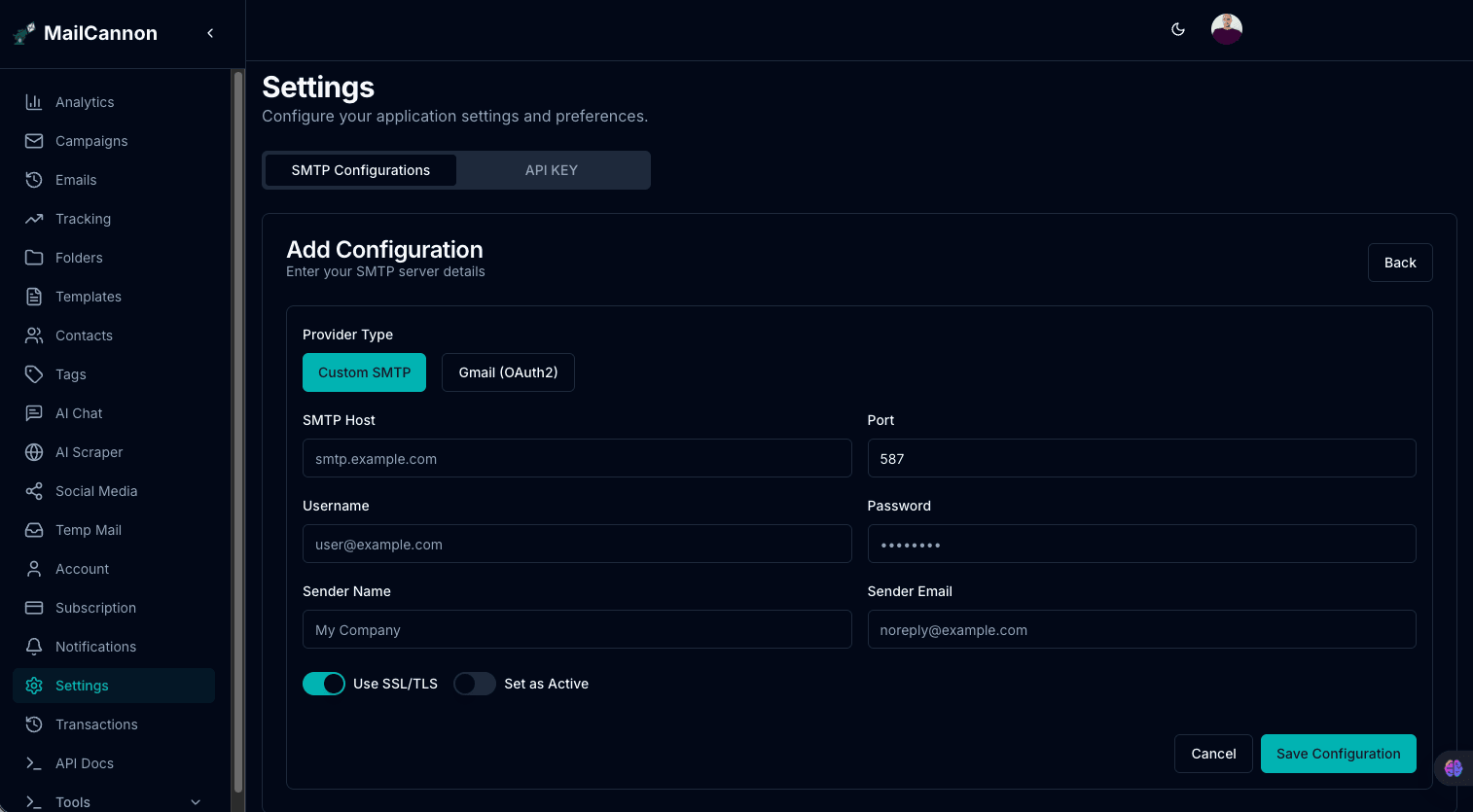
The screenshot above is the same four values in a real interface: MailCannon asks for a name, a host, a port, a username, a password and an encryption mode, and nothing else. If a provider's documentation gives you those four correctly, the form is finished work.
Where to find your SMTP settings
Almost everyone who asks what an SMTP server address is turns out to be looking for the hostname and port their provider expects. These are the four sources you will meet most often.
| Provider | Host | Port | Username | Password |
|---|---|---|---|---|
| Google Workspace / Gmail | smtp.gmail.com | 587 or 465 | your full Gmail address | a 16-character App Password, because Google no longer accepts account passwords |
| Microsoft 365 / Outlook | smtp.office365.com | 587 | your full mailbox address | your mailbox password or an app password; SMTP AUTH may need enabling per mailbox |
| cPanel / shared hosting | mail.yourdomain.com or the hostname in your welcome email | 587 or 465 | the full email address you created in the panel | the password you set for that mailbox |
| Amazon SES | email-smtp.<region>.amazonaws.com | 587, 465 or 25 | the SMTP username generated in the console | the SMTP password generated alongside it |
Provider defaults change, so confirm these against your provider's current documentation before you hard-code them anywhere.
Authentication, and why it fails
Most SMTP problems are not mysterious once you read the response code. Four of them account for the overwhelming majority of failed setups.
- 535 authentication failed. The username is wrong, or a plain account password was sent where the provider now requires an app password or an API secret.
- 550 relay denied. The username authenticated, but it is not authorised to send for the domain in the From header — a mismatch between the mailbox you logged in with and the address you are pretending to send from.
- Connection timeout. The wrong port, or a port your network blocks. If the server never answers at all, check which SMTP ports are open to you before you touch the credentials.
- Certificate or handshake errors. Implicit TLS configured on a STARTTLS port, or the reverse. The connection reaches the server and then disagrees about how encryption starts.
Once authentication succeeds, the remaining question is whether inbox providers trust you. That part is decided by records on your domain rather than by the connection, which is what our guide to SPF, DKIM and DMARC covers.
An SMTP server is not the same as an email API
Both routes end in the same place: a message arrives at the recipient's mail server. What differs is everything you own along the way. With SMTP you manage the connection yourself — the host, the port, the credentials, the retry logic when a server temporarily refuses a message, and the reputation of whatever IP your provider lends you. When something breaks, the error is yours to interpret.
An email API hands most of that to the provider. Authentication, retries, IP pools and reputation are their problem, and you send a structured request instead of speaking a protocol. Most products end up using both: SMTP for the mailboxes people actually reply from, an API for high-volume sending. The MailCannon documentation covers both paths, and MailCannon accepts a custom SMTP server as well as a provider API key, so you can start with the mailbox you already have.
Frequently asked questions
What is an SMTP server address?
It is the hostname and port your client connects to — for example smtp.gmail.com on port 587. People say "address" and mean both parts, because either one wrong produces the same failure.
Do I need my own SMTP server?
No. Almost every business sends through its email provider's server or through an email service provider. Running your own means managing IP reputation, reverse DNS, blocklists and abuse complaints yourself — real work, and rarely the point of the product you are building.
What port should I use for SMTP?
587 with STARTTLS, or 465 with implicit TLS if your provider documents it. Port 25 is for server-to-server relay and is usually blocked for outbound use.
Is my SMTP username my email address?
Usually yes, especially with mailbox providers. Some providers issue a separate login, and some — Amazon SES is the classic example — give you an SMTP username and password generated in their console that have nothing to do with any mailbox.
What is an SMTP relay?
Strictly, it is a mail server forwarding a message onward to another mail server instead of delivering it straight to the destination. The term is also used loosely for an email service provider that accepts your mail and delivers it on your behalf.
Can I send bulk email from my web host's SMTP server?
Usually not at volume. Shared hosts cap hourly sending, and their IPs are often poor for bulk mail because thousands of other customers share the same reputation. For campaigns, use a provider meant for it.
Next step
With the four settings in hand, the natural next reads are our explanation of what SMTP is and the SMTP ports guide. Then put the credentials to work: run the Email Deliverability Checker against your domain, and add the server in MailCannon settings to send your first campaign through it.
Start Your Email Campaigns
Manage contacts, build campaigns, and send marketing email from one dashboard with MailCannon.
Advertisement