Advertisement
Why Are My Emails Going to Spam? 15 Causes and Solutions
Your emails are going to spam because receiving providers evaluate many signals about your mail, including sender reputation, authentication, recipient engagement, bounce and complaint rates, sending behavior, content, and links. Landing in spam is rarely caused by a single factor. In this guide, we explain the most common reasons and walk through how to diagnose and fix them.
Why Do Emails Go to Spam?
Modern mailbox providers such as Gmail, Outlook, and Yahoo decide where email goes by looking at multiple signals at once. Each provider may weigh those signals differently, and their methods are not public. In general, they consider:
- Sender reputation
- Domain reputation
- IP reputation
- Authentication
- Recipient engagement
- Spam complaints
- Bounces
- Content
- Sending patterns
Because these factors work together, there is usually no single cause. Understanding them helps you focus on what you can improve.
15 Reasons Your Emails May Be Going to Spam
1. Recipients Did Not Explicitly Opt In
Sending to people who never agreed to receive your mail is one of the most common causes of spam placement. Providers notice when recipients did not expect a message.
Why it matters: unexpected mail leads to complaints and low engagement, which hurt your reputation.
Solution: build permission-based lists and use clear opt-in so subscribers know what they agreed to.
2. You Bought or Scraped an Email List
Purchased, scraped, or harvested lists contain addresses that never agreed to hear from you.
Why it matters: these lists include invalid addresses, cause complaints and low engagement, damage your reputation, and create compliance risks.
Solution: never buy or scrape lists. Grow your own list through legitimate signups and opt-ins.
3. Your Sender Reputation Is Poor
Reputation includes your domain reputation, IP reputation, and your historical sending behavior, including complaints and bounces.
Why it matters: providers trust senders with a good reputation more than unknown or tarnished ones.
Solution: build a reputation over time with consistent, responsible sending and a clean list.
4. Your Domain Is Not Properly Authenticated
Authentication helps providers confirm an email really comes from you:
| Authentication | Purpose |
|---|---|
| SPF | Identifies authorized sending servers |
| DKIM | Cryptographically signs messages |
| DMARC | Defines policy and reporting around authentication |
Why it matters: unauthenticated mail looks less trustworthy and is more likely to be filtered.
Solution: configure SPF, DKIM, and DMARC. Authentication helps, but it does not guarantee inbox placement on its own.
5. Your Emails Have Too Many Bounces
A hard bounce is a permanent failure (an address that does not exist). A soft bounce is a temporary problem, such as a full inbox or a server issue.
Why it matters: repeated delivery failures are a warning sign to providers and drag down your reputation.
Solution: keep your list clean, remove hard-bouncing addresses, and limit retries to addresses that keep failing.
6. Your Emails Receive Too Many Spam Complaints
When recipients repeatedly mark your messages as spam, providers take it as a strong signal that your mail is unwanted.
Why it matters: high complaint rates directly lower your sender reputation.
Solution: match subscriber expectations, make the sender recognizable, and make unsubscribing easy so people leave instead of complaining.
7. You Are Sending to Inactive Recipients
Repeatedly sending to subscribers who never open or click can signal that your address is unwanted.
Why it matters: low engagement on a large portion of your list drags down campaign performance and reputation.
Solution: segment your audience, run re-engagement campaigns, and remove or suppress consistently inactive contacts when appropriate.
8. Your Sending Volume Changed Suddenly
A sharp, unexpected jump in volume can look like automated or fraudulent behavior.
Why it matters: providers may throttle or filter senders whose behavior changes abruptly.
Solution: keep a consistent sending pattern and increase volume gradually and responsibly.
9. Your Subject Lines Are Misleading
Fake urgency, deceptive "Re:" or "Fwd:" prefixes, misleading claims, and excessive punctuation can all look spammy.
Why it matters: misleading subjects hurt trust and engagement, and they can push providers toward filtering.
Solution: make the subject line accurately represent the email and offer real value.
10. Your Email Contains Suspicious or Low-Quality Links
Broken links, suspicious domains, mismatched visible-versus-destination URLs, and links to low-quality domains all raise flags.
Why it matters: providers treat risky links as signs of spam or phishing.
Solution: use legitimate, recognizable destinations and test every link before sending.
11. Your Email Is Mostly an Image
Image-only emails are hard to read, inaccessible, and easy for providers to evaluate poorly.
Why it matters: without meaningful text, some providers see less useful content. Image-only mail does not automatically go to spam, but it can contribute to problems.
Solution: include meaningful text, descriptive content, accessible HTML, properly sized images, and alt text.
12. Your Email HTML Is Poorly Constructed
Broken HTML, invalid markup, excessive styling, and rendering problems can confuse clients and filters.
Why it matters: badly built email looks unprofessional and may be flagged or rendered poorly.
Solution: test across email clients and keep your markup clean, responsive, and accessible.
13. Your Emails Are Irrelevant to Subscribers
If a subscriber signed up for one thing but keeps receiving unrelated content, they stop engaging.
Why it matters: a subscriber interested in product A who constantly receives product B content will ignore or report your mail.
Solution: segment your audience and send relevant content based on interests and behavior.
14. Your Emails Are Too Frequent
Sending more often than subscribers expect can drive complaints and unsubscribes.
Why it matters: oversending makes your mail feel unwelcome, lowering engagement and raising complaints.
Solution: keep a consistent schedule, offer preference management, segment, and monitor complaints and unsubscribes. There is no universal "correct" number of emails per week.
15. Your Email Does Not Clearly Identify the Sender
A vague or misleading sender name and address makes recipients unsure who is writing.
Why it matters: recipients are more likely to trust and open mail from a recognizable, legitimate sender.
Solution: use a recognizable sender name, a legitimate sender address, clear company identity, and consistent branding.
Advertisement
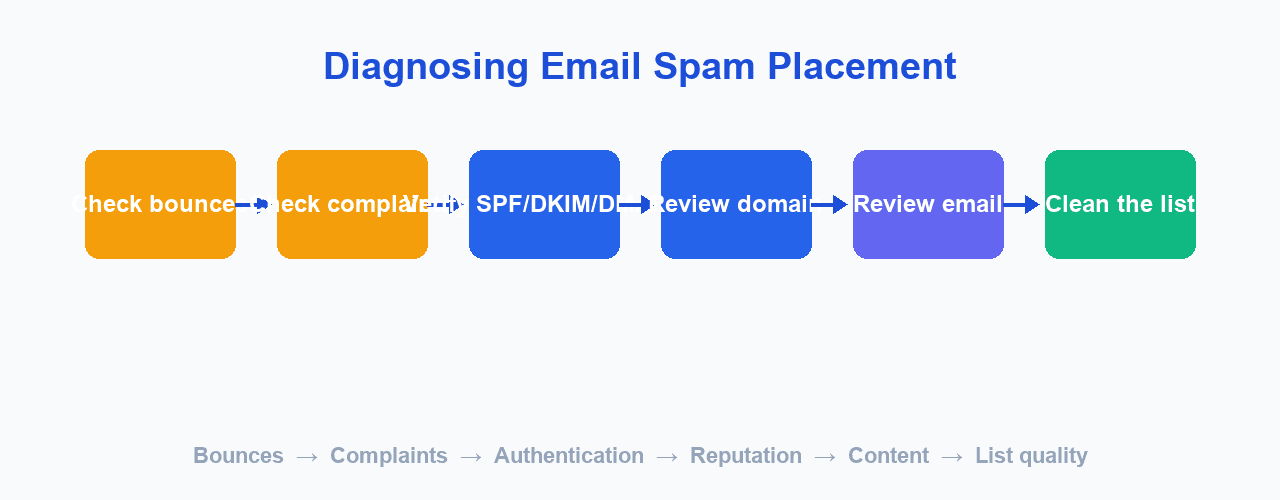
How to Find Out Why Your Emails Are Going to Spam
Step 1 — Check whether the problem affects one provider or multiple providers
Compare results across Gmail, Outlook, Yahoo, and business domains. If only one provider filters you, the cause may be provider-specific; if all do, the root cause is more general.
Step 2 — Check bounce and complaint data
Look at hard bounces, soft bounces, complaints, and unsubscribes. High numbers point to list and permission problems.
Step 3 — Verify SPF, DKIM, and DMARC
Make sure your domain is correctly authenticated. Missing or incorrect records are a common cause.
Step 4 — Review your sending domain
Check your domain reputation, configuration, and sending history. A new or damaged domain needs time and care.
Step 5 — Review the email itself
Check the subject line, content, links, HTML, images, and sender information for anything that looks weak or misleading.
Step 6 — Review the recipient list
Check permission, invalid addresses, inactive subscribers, and whether unsubscribes were honored.
How to Stop Emails From Going to Spam
- Send only to permission-based recipients.
- Keep lists clean.
- Configure SPF.
- Configure DKIM.
- Configure DMARC.
- Monitor bounces.
- Monitor spam complaints.
- Use a recognizable sender.
- Send relevant content.
- Segment your audience.
- Maintain a consistent sending pattern.
- Make unsubscribing easy.
- Test emails before sending.
- Monitor campaign performance.
- Protect your sending domain.
How SPF, DKIM, and DMARC Help Deliverability
Authentication proves your email comes from your domain. Here is how each mechanism works using a placeholder domain like example.com:
SPF
SPF publishes a list of servers allowed to send mail for example.com. Receiving providers check whether the connecting server is on that list.
DKIM
DKIM signs each message with a cryptographic key. The receiver can verify the signature, confirming the message was not altered and was authorized by the domain.
DMARC
DMARC tells providers what to do when a message fails SPF and DKIM, and it gives you reports about how your domain is being used. It connects authentication to policy and reporting.
Together these help providers recognize legitimate senders and protect your domain from abuse, which supports better deliverability.
Does Email Content Cause Spam?
Email content can influence filtering, but there is no simple list of "spam words" that determines inbox placement. Modern filtering is far more sophisticated than basic keyword matching.
What matters more is the overall picture:
- Relevance to the recipient
- Misleading or deceptive content
- Links to risky destinations
- Formatting and HTML quality
- Sender identity and reputation
- Recipient engagement
Old advice like "never use the word FREE" oversimplifies how filtering works today. A well-received campaign can include promotional words, and a poorly received one can go to spam without any "spammy" words at all.
Does Using MailCannon Prevent Emails From Going to Spam?
An email marketing platform like MailCannon can help you manage campaigns and sending workflows, but it cannot guarantee that every email reaches the inbox. Deliverability also depends on your:
- Sender configuration
- Domain authentication
- Recipient permission
- List quality
- Sender reputation
- Email content
- Sending practices
- Receiving provider policies
MailCannon handles the tools and the sending workflow; the health of your list and domain remains your responsibility.
How MailCannon Can Help You Manage Email Campaigns
MailCannon provides tools to run legitimate email marketing campaigns, including:
- Contact lists and CSV contact import
- HTML email templates
- Campaign creation
- SMTP configuration
- Email campaign sending
- Campaign management
You can use MailCannon to manage your email campaigns and keep your contacts organized from one dashboard, while you stay responsible for permission, list quality, content, and domain configuration.
Email Deliverability Checklist
☐ Recipients opted in
☐ Email list is clean
☐ Unsubscribed users are removed
☐ SPF is configured
☐ DKIM is configured
☐ DMARC is configured
☐ Sender identity is clear
☐ Subject line is accurate
☐ Links are legitimate
☐ HTML has been tested
☐ Email works on mobile
☐ Bounce rate is monitored
☐ Spam complaints are monitored
☐ Sending frequency matches expectations
☐ Campaign results are monitored
Frequently Asked Questions
Why are my emails going to spam?
Emails go to spam when providers see risky signals such as unmet permission, a poor reputation, missing authentication, high bounces or complaints, misleading content, or sudden volume changes. Providers weigh many factors together.
How do I stop my emails from going to spam?
Send to permission-based recipients, keep your list clean, authenticate with SPF, DKIM, and DMARC, use a recognizable sender, send relevant content, and monitor bounces and complaints.
Why do my marketing emails go to spam?
Marketing email is more likely to go to spam when recipients did not opt in, lists are purchased or stale, content is misleading, or sending suddenly spikes. Good permission, hygiene, and consistency help.
Does SPF prevent emails from going to spam?
SPF helps providers verify an authorized server sent the message, which supports deliverability, but it does not guarantee the inbox on its own.
Does DKIM improve email deliverability?
Yes. DKIM verifies a message was not altered and helps establish you as a legitimate sender, supporting better deliverability alongside SPF and DMARC.
Does DMARC prevent spam?
DMARC defines handling for failed authentication and provides reporting. It protects your domain and supports deliverability, but it does not separately block all spam.
Why do legitimate emails go to spam?
Even legitimate email can go to spam if reputation, authentication, list quality, or sending behavior look weak to a provider. Providers evaluate many signals.
Can a new domain have deliverability problems?
Yes. New domains have little sending history and may be treated cautiously. Warm them up with modest, consistent, authenticated sending to a clean list.
Can purchased email lists cause spam problems?
Yes. Purchased or scraped lists cause high bounces, complaints, low engagement, a damaged reputation, and compliance risks. Never buy or scrape lists.
How can I improve my sender reputation?
Send to permission-based recipients, keep bounces and complaints low, authenticate your domain, send consistently, and engage subscribers with relevant content. Reputation builds over time.
Conclusion
Emails go to spam because providers weigh a mix of signals: permission, reputation, authentication, list quality, content, and sending behavior. Diagnosing your own situation starts with checking bounces, complaints, authentication, and the email itself. Improving deliverability is a matter of consistent, legitimate practice rather than a single fix.
If you are new to email marketing, start with our guide to what email marketing is and how it works. For a deeper look at sending at scale, see our article on how to send bulk emails without going to spam.
Create Your Next Email Campaign
Manage contacts, craft campaigns, and send marketing email from one dashboard with MailCannon.
Advertisement