Advertisement
What Is Email Personalization? 10 Ways to Personalize Emails
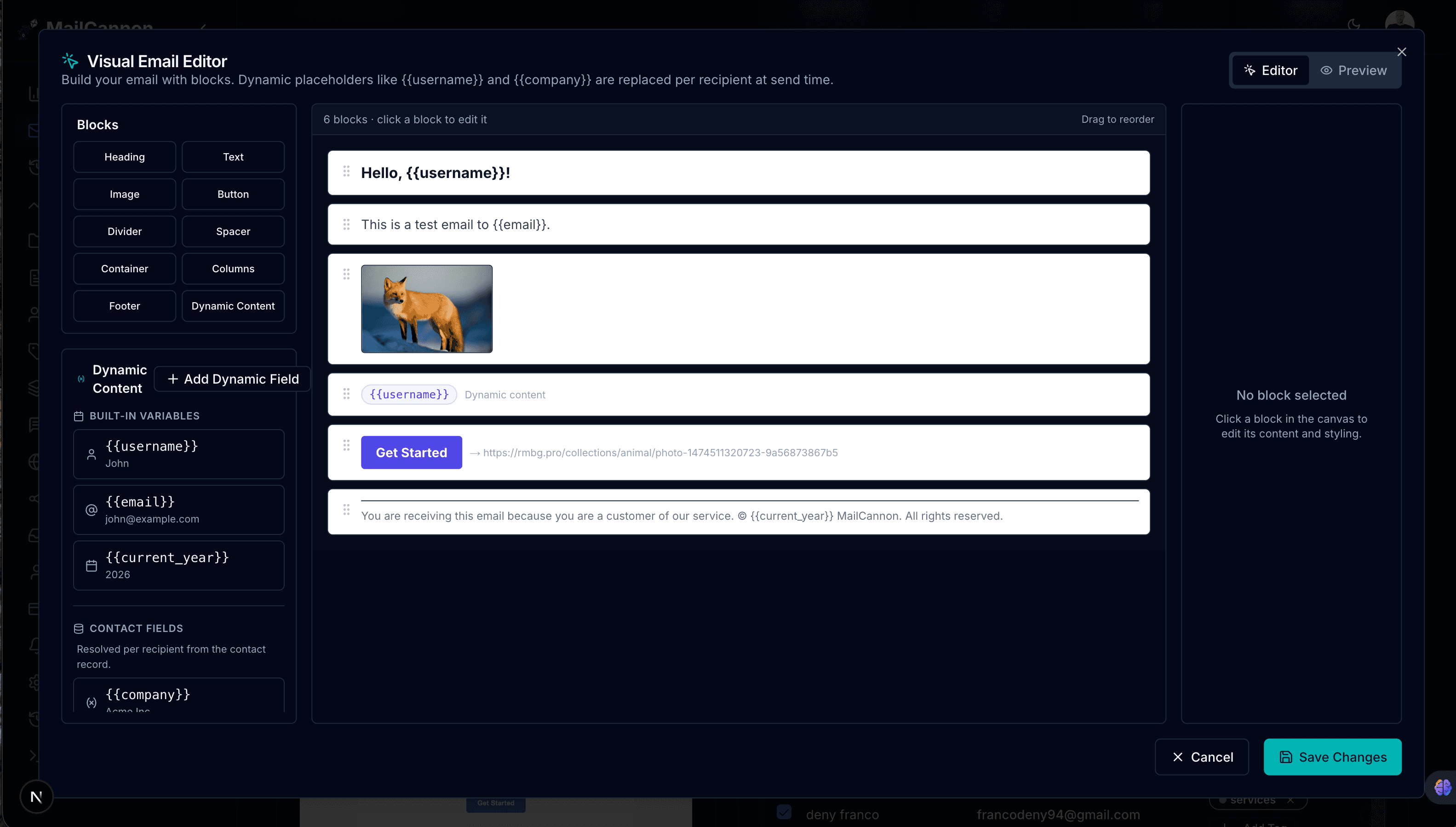
Email personalization is the practice of adapting an email's content, message, offer, timing, or experience using information about the recipient, so the message feels more relevant to them. MailCannon now offers a drag-and-drop visual editor that makes building personalized email templates easier than ever.
Consider the difference between these two messages:
- Generic email: "Check out our latest products."
- Personalized email: "Hi Sarah, based on your previous purchase, you may like these new products."
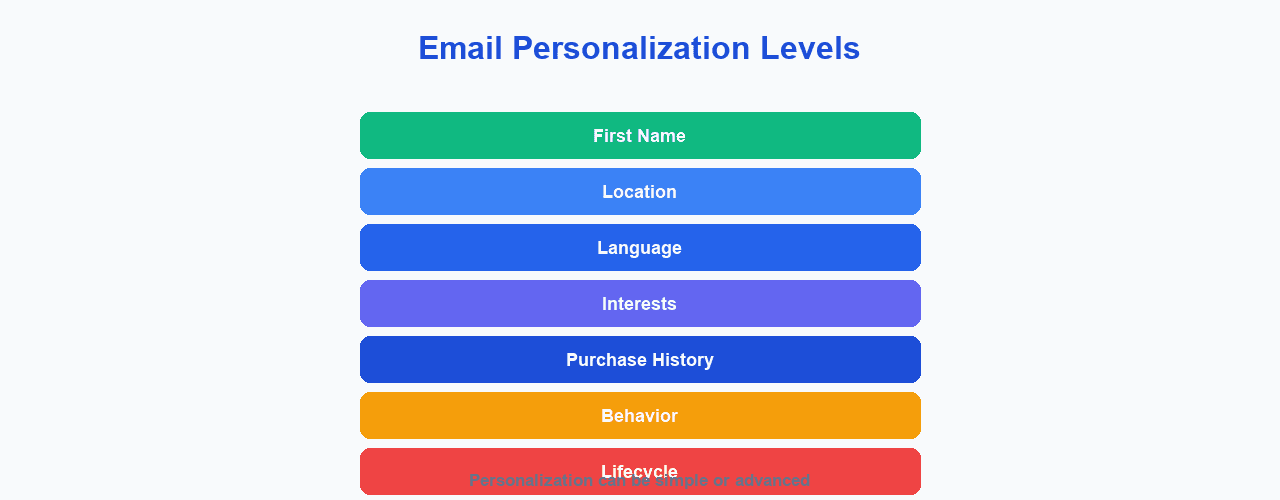
Personalization can range from simple elements such as using a subscriber's name to more advanced approaches based on preferences, behavior, purchase history, or lifecycle stage. Personalization does not automatically increase performance — results depend on data quality, relevance, campaign design, your audience, and execution.
What Is Email Personalization?
Email personalization is adapting the content of an email using information about the recipient. The information you can draw on includes:
- Name
- Location
- Language
- Interests
- Previous purchases
- Customer status
- Website behavior
- Email engagement
- Lifecycle stage
- Preferences
Personalization can be simple, such as greeting a subscriber by name, or advanced, such as showing a product recommendation based on past behavior. The right level depends on the data you have and the goal of the campaign.
A useful way to think about it: personalization uses what you know about a person to shape the email they receive. If you only know a name, you can use that. If you know their location, language, or purchase history, you can go further. The more relevant and accurate the data, the more you can tailor the message — but only if that tailoring actually makes the email more useful to the recipient.
Why Is Email Personalization Important?
Personalization can offer a number of potential benefits:
- More relevant content — messages match the recipient's situation
- Better customer experience — emails feel less like broadcast messages
- More useful recommendations — suggestions relate to real interest or history
- Better communication — the right detail at the right time
- More targeted campaigns — content adapts to the audience
- Improved customer relationships — recipients may feel better understood
Be careful with wording. Personalization can help, may improve engagement, and works best when implemented correctly. It does not guarantee higher open rates, click rates, sales, or better deliverability on its own.
Email Personalization vs Email Segmentation
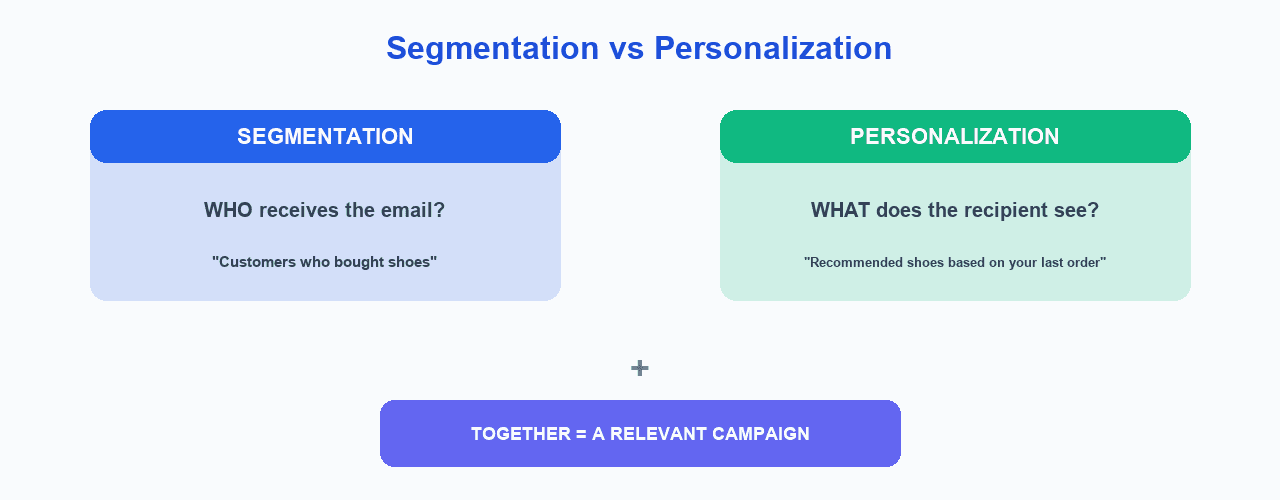
Segmentation decides who should receive a campaign. Personalization adapts what the recipient sees. To understand who should receive a campaign, see our guide on email segmentation. Here is an example:
- Segmentation: customers who purchased running shoes
- Personalization: "Based on your previous running-shoe purchase, here are three new products you may like."
Here is a quick comparison table:
| Segmentation | Personalization | |
|---|---|---|
| Main question | Who? | What? |
| Purpose | Group contacts | Adapt content |
| Example | Customers | "Hi Sarah" |
| Data | Shared characteristics | Individual or contextual data |
| Can work together? | Yes | Yes |
10 Ways to Personalize Emails
Here are ten common ways to personalize your email campaigns.
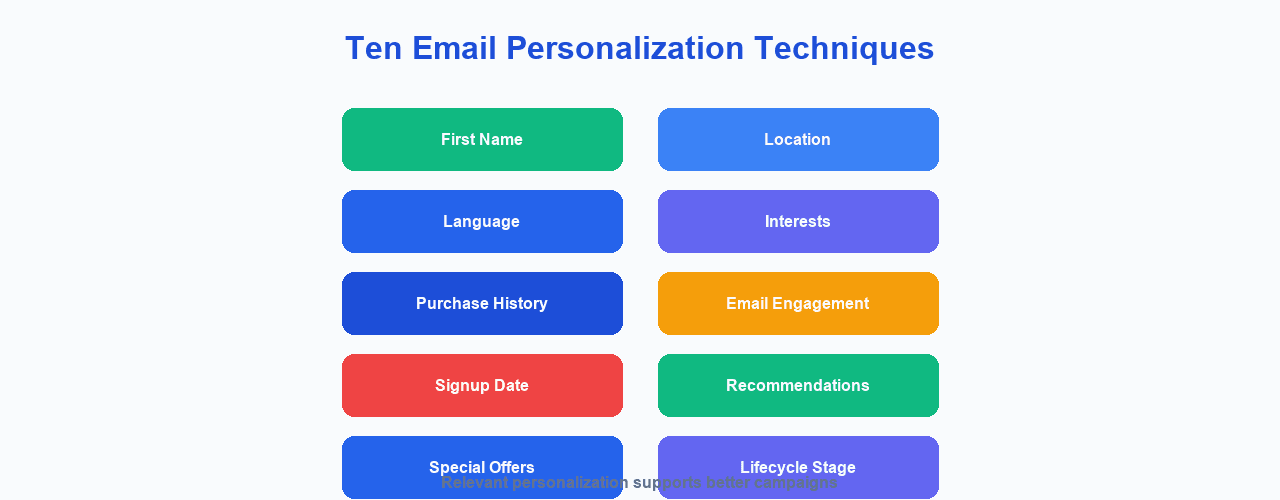
You do not have to use every technique at once. Pick the ones that fit the data you already collect and the goal of the campaign. Starting with one or two techniques that rely on reliable data is often more effective than trying to personalize every element using information you are not sure about.
1. Use the Recipient's Name
First-name personalization can be used in the subject line, greeting, or body copy. Names should be validated and handled carefully — do not assume every contact has a reliable first name, and avoid showing a blank or incorrect placeholder to a recipient.
2. Personalize by Location
Use details such as country, city, region, or time zone. This supports local events, local promotions, store availability, and localized content, and it can help with time-zone-aware sending.
3. Personalize by Language
Sending in a subscriber's preferred language can make content more relevant. Do not try to infer language from unreliable data; a stated preference or verified location is far more useful.
4. Use Purchase History
Reference related products, complementary products, reorder reminders, or customer education suited to what someone has bought. Use purchase information responsibly and only for relevant, appropriate messages.
5. Personalize Based on Interests
Group content by product categories, content topics, newsletter preferences, or services so that people receive the subjects they care about most.
6. Personalize by Customer Lifecycle
Adapt messages to the recipient's stage: new subscriber, trial user, new customer, returning customer, long-term customer, or at-risk customer. For example, a new customer may need onboarding help, while an at-risk customer may respond to a helpful check-in.
7. Personalize Recommendations
Use messages such as "Customers who purchased X may also be interested in Y." Recommendations should be genuinely relevant to the recipient. Do not make unsupported claims about AI-generated recommendations.
8. Personalize Based on Email Engagement
Consider segments such as highly engaged, recently engaged, or inactive subscribers. Do not treat open rates as perfectly accurate. Google's sender guidance notes that open-rate measurement can vary and should not be treated as a definitive measure of engagement, so focus on measurable interactions such as clicks and purchases where possible.
9. Personalize Offers
Tailor offers to the recipient, such as existing-customer offers, first-purchase offers, loyalty rewards, or relevant promotions. Not every subscriber needs to receive the same offer.
10. Personalize Email Timing
Consider time zone, customer lifecycle, trigger-based communication, and user actions. Be careful not to claim that any specific sending time is universally optimal — results vary by audience.
Email Personalization Examples
These examples are meant as illustrations only.
- E-commerce: "Based on your previous purchase, you may like these."
- SaaS: "You've been using feature X — here's how to get more from it."
- Newsletter: "Because you previously selected this topic..."
- Local business: "Events happening near you."
- B2B: "Resources for your industry."
- Re-engagement: "We noticed you haven't visited recently."
Personalized Subject Lines
Personalization can be applied to the subject line, preview text, and email body. For example:
- Generic: "Discover our new collection"
- Personalized: "Sarah, discover our new collection"
Adding a first name is only the simplest form of personalization. More relevant results usually come from adapting the offer, recommendation, or content to what the recipient actually cares about.
When you do use a name in a subject line, make sure the data is correct. A wrong or missing name can hurt trust more than a generic subject line. Also be aware that different email clients and preview panes truncate subject lines at different lengths, so keep both the personalized and the fallback versions readable.
Personalized Email Content
Personalized content can be built with dynamic blocks that change depending on the recipient. Conceptually:
IF customer = premium
    show premium offer
ELSE
    show standard offer
Tools implement this differently. The idea is that the email adapts its content to the person receiving it rather than showing everyone the same message.
When testing dynamic content, preview how the email renders for recipients with and without the relevant data. Decide in advance what a recipient sees when a value is missing, so the email still reads naturally instead of showing a blank or broken placeholder.
Drag-and-Drop Visual Email Editor
Building personalized emails does not have to mean writing raw HTML. MailCannon now includes a drag-and-drop visual email editor that lets you design and personalize campaigns visually, without touching code. You drag content blocks onto a canvas, arrange them, fill in properties, and insert dynamic variables that adapt to each recipient at send time.
The editor gives you a block-based canvas with a palette of building blocks: headings, text, images, buttons, dividers, spacers, containers, multi-column layouts, footers, and a dedicated dynamic content block. You drag a block from the palette onto the canvas, reorder it with the arrow controls, and edit its properties in a side panel. Colors, padding, alignment, border radius, and link URLs are all configurable without code.
The dynamic content block is the key to personalization in the visual editor. When you drag it onto the canvas, a panel shows all available variables: built-in values like {{username}}, {{email}}, and {{current_year}}; contact profile fields like {{company}}, {{city}}, and {{plan}}; and custom fields you define yourself. Click any variable to insert it into the template automatically. You can also add your own custom fields with a name and an example value, and the editor will normalize the name and let you preview how it renders.
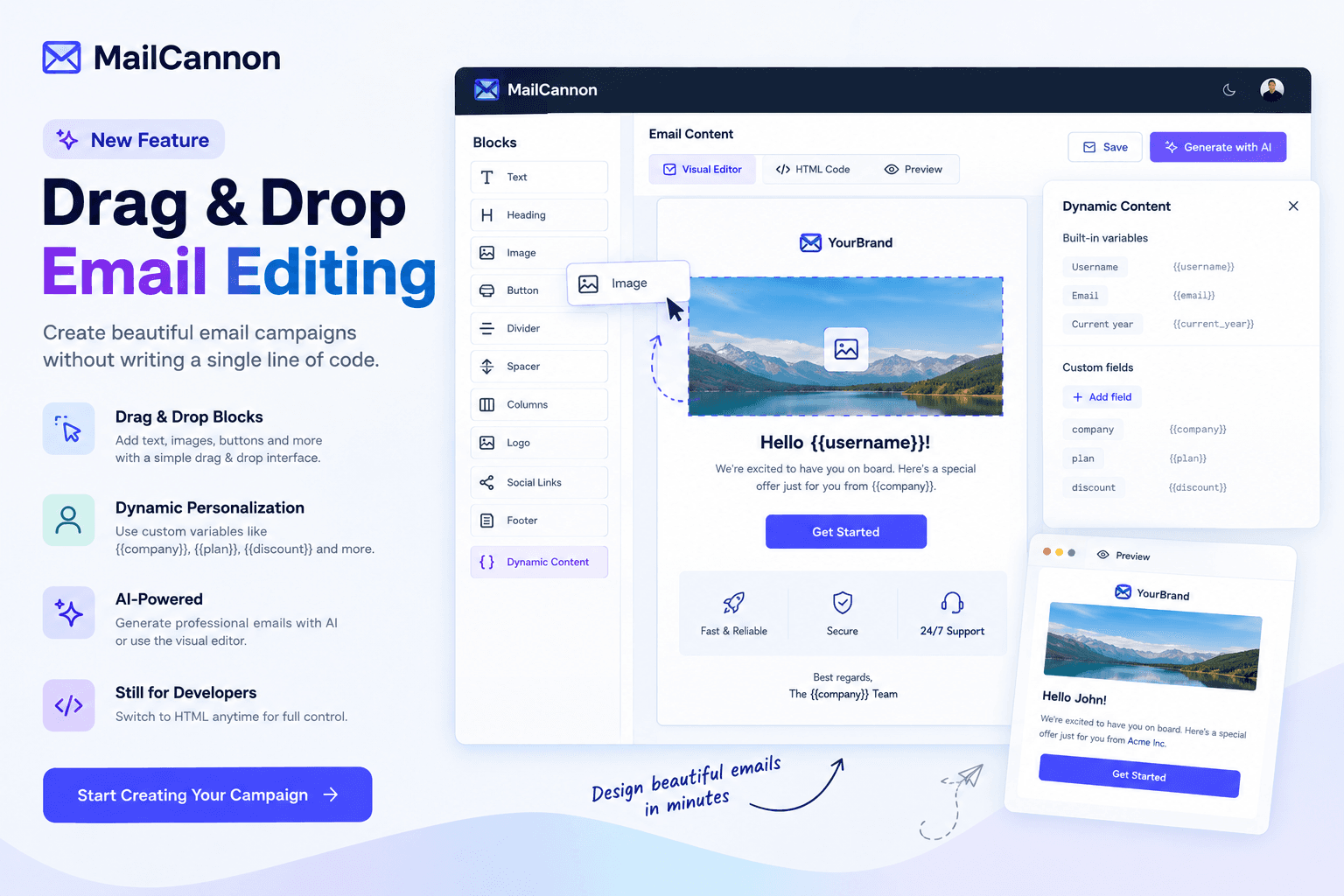
You can switch between the visual editor and the HTML code editor at any time using the tab bar at the top of the editor. The preview tab shows sample values so you can see what the email looks like before sending. All variables are resolved per recipient at send time, so each person gets a personalized version of the same template. The visual editor produces email-safe HTML that works across major email clients, including Outlook.
How to Personalize Emails Step by Step
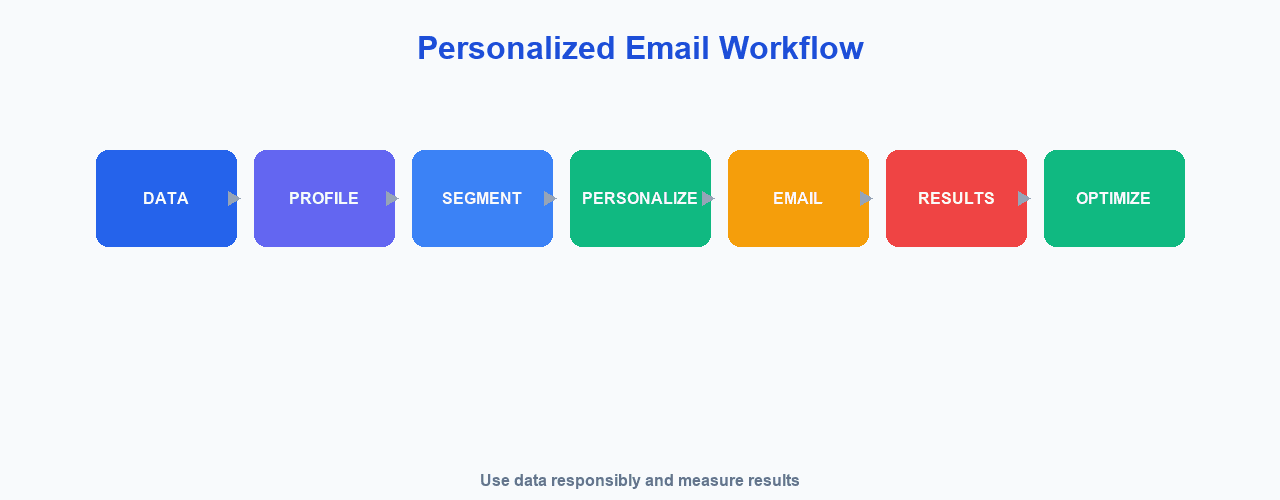
- Define the campaign objective — know what you want to achieve
- Identify useful customer data — decide which details matter
- Verify data quality — check that your data is accurate
- Choose the personalization strategy — decide what to adapt
- Create relevant content — write the message
- Test the campaign — preview and test before sending
- Send to the appropriate audience — use segmentation where it helps
- Measure results — review performance
- Improve the strategy — refine based on what you learn
Advertisement
Common Email Personalization Mistakes
- Using incorrect names — errors that damage trust
- Over-personalizing — more is not always better
- Using irrelevant data — details that do not matter to the message
- Collecting unnecessary information — only collect what you need
- Making personalization creepy — referencing intrusive details
- Relying on poor-quality data — bad data leads to bad emails
- Sending the same recommendation to everyone — that is not real personalization
- Forgetting mobile users — content must work on small screens
- Not testing personalized content — errors and broken variables slip through
- Ignoring privacy requirements — respect consent and applicable laws
When Personalization Goes Too Far
There is a difference between helpful and intrusive personalization.
- Helpful: "Here are products related to your previous purchase."
- Potentially uncomfortable: "We know you visited this page three times yesterday at 10:42 PM."
Use customer information responsibly and transparently. Good personalization respects the recipient and never makes them feel watched or uncomfortable.
As a general rule, ask whether a detail genuinely helps the recipient. If it only makes the message feel more targeted to you but adds nothing useful to them, it may cross the line into intrusive. When in doubt, use the least specific information that still delivers the value.
Email Personalization and Privacy
- Data minimization — collect only what you need
- Transparency — be clear about how you use data
- Consent where required — follow applicable rules
- Preference management — let people control their preferences
- Unsubscribe — make it easy to opt out
- Data protection — keep customer data secure
- Security — protect the data you hold
This is not legal advice. Applicable privacy and data-protection requirements depend on your jurisdiction and context, so review the rules that apply to your business.
Email Personalization and Deliverability
Sending relevant, wanted messages can reduce the likelihood that recipients consider your emails unwanted. That supports good sending practices, but personalization itself does not guarantee inbox placement. Sender reputation depends on many factors. To go deeper, see our guides on email deliverability, how to improve email deliverability, and why emails go to spam.
Email Personalization for Email Marketing
Personalization fits into many kinds of email, including campaigns, newsletters, promotional emails, product announcements, customer onboarding, re-engagement, and transactional communication. In each case the goal is the same: make the message more relevant to the person receiving it. For the technical foundation behind reliable sending, see our SMTP and SPF, DKIM and DMARC guides.
A practical way to start collecting personalization data is to ask subscribers what they want during signup or through a preference page, such as their topic interests, preferred language, or how often they would like to hear from you. Data you gather with the person's knowledge is usually more reliable and more respectful than data you infer, and it directly supports more relevant, wanted email.
How MailCannon Can Help
MailCannon supports template variables in its HTML email templates, which lets you personalize content for each recipient. For example, you can place variables such as {{ first_name }} in a template to greet each contact by name. MailCannon also offers a drag-and-drop visual email editor where you can build and personalize templates without writing code. The editor provides a block-based canvas with a palette of content blocks and a dynamic content panel that makes it easy to insert variables. You can switch between the visual editor and the HTML code editor at any time. MailCannon also offers contact management with tags and filtering, CSV import, campaign creation and management, and flexible SMTP sending to support the broader email workflow.
Start a free trial to manage contacts, build templates, and send campaigns. To understand how to reach a relevant audience, also see our guide on how to send bulk emails without going to spam.
Email Personalization Checklist
- Define the campaign goal
- Identify useful customer data
- Verify data quality
- Choose relevant personalization
- Keep the message useful
- Avoid excessive personalization
- Respect privacy
- Test personalized content
- Make the unsubscribe process clear
- Measure campaign performance
- Improve based on results
Frequently Asked Questions
What is email personalization?
Email personalization is the practice of adapting an email's content, message, offer, timing, or experience using information about the recipient, so the message feels more relevant to them.
Why is email personalization important?
It can help emails feel more relevant and useful, improve the customer experience, and support more targeted communication. Results depend on data quality, relevance, campaign design, audience, and execution.
How do I personalize an email?
Start with reliable data such as a name or location, use template variables to adapt content, add relevant recommendations, tailor offers, and adjust timing where it makes sense. Always respect privacy and test your campaigns.
What are examples of email personalization?
Using a recipient's name, mentioning their location, writing in their preferred language, referencing a previous purchase, recommending related products, or sending content suited to their lifecycle stage.
What is the difference between personalization and segmentation?
Segmentation decides who should receive a campaign by grouping subscribers, while personalization adapts what the recipient sees within that campaign. They are often used together.
Can I personalize email subject lines?
Yes. You can use a recipient's name or other relevant details in the subject line, preview text, and body. This is only the simplest form of personalization and should be used carefully with reliable data.
Can personalization improve email engagement?
Relevant personalization can help improve engagement, but it does not guarantee results. Performance depends on the audience, content relevance, data quality, timing, and execution.
How can I personalize emails without being intrusive?
Use information clearly relevant to the message, be transparent, avoid referencing overly detailed or sensitive activity, respect privacy and consent, and always make unsubscribing easy.
What customer data can be used for personalization?
Data you legitimately collect and are allowed to use, such as name, location, language, interests, purchase history, engagement, signup date, and lifecycle stage. Only collect what is necessary and obtain consent where required.
Is email personalization required for email marketing?
It is not a strict requirement, but it is a widely recommended best practice because relevant, wanted messages support better sending practices. Even simple personalization can be more useful than a generic message.
How can I personalize emails in bulk?
Use template variables in your email templates so each recipient receives content adapted with their own data, such as their name or location. The exact variables available depend on your email tool.
How does the drag-and-drop visual editor help with personalization?
MailCannon's visual email editor lets you build personalized templates by dragging content blocks onto a canvas and inserting dynamic variables from a built-in panel. You can use contact profile fields, custom variables, and built-in values like name, email, and current year, and the editor resolves each variable per recipient at send time.
Does MailCannon support email personalization?
MailCannon supports template variables in its HTML email templates, so you can personalize content for each recipient. It also offers a drag-and-drop visual email editor with a built-in dynamic content panel, contact management with tags, CSV import, campaign management, and flexible SMTP sending. Check the MailCannon product for the current set of available variables.
Conclusion
Email personalization adapts your messages to the person receiving them, making campaigns feel more relevant. Start with reliable data, keep personalization helpful rather than intrusive, respect privacy, and test before you send. If you want to build personalized templates without writing code, MailCannon's drag-and-drop visual editor makes it straightforward to insert dynamic variables into a block-based layout. To understand who should receive each campaign, pair personalization with email segmentation and learn how to improve email deliverability.
Start Your Email Campaigns
Manage contacts, build templates, and send personalized marketing email from one dashboard with MailCannon.
Advertisement